Categories
Restaurant POS Retail POS

How to Compare POS Systems Before Buying: The Complete Evaluation Guide

Not all POS systems are built the same, and the wrong choice can cost you thousands.

This guide covers every criterion you need to evaluate before committing to a point-of-sale system, from real-time inventory and payment processing to hidden fees, hardware lock-in, and multi-location scalability.

In this guide

  1. What is a POS system, and why does your choice matter?
  2. Cloud POS vs on-premise POS: which is right for you?
  3. The 8 must-evaluate criteria before buying
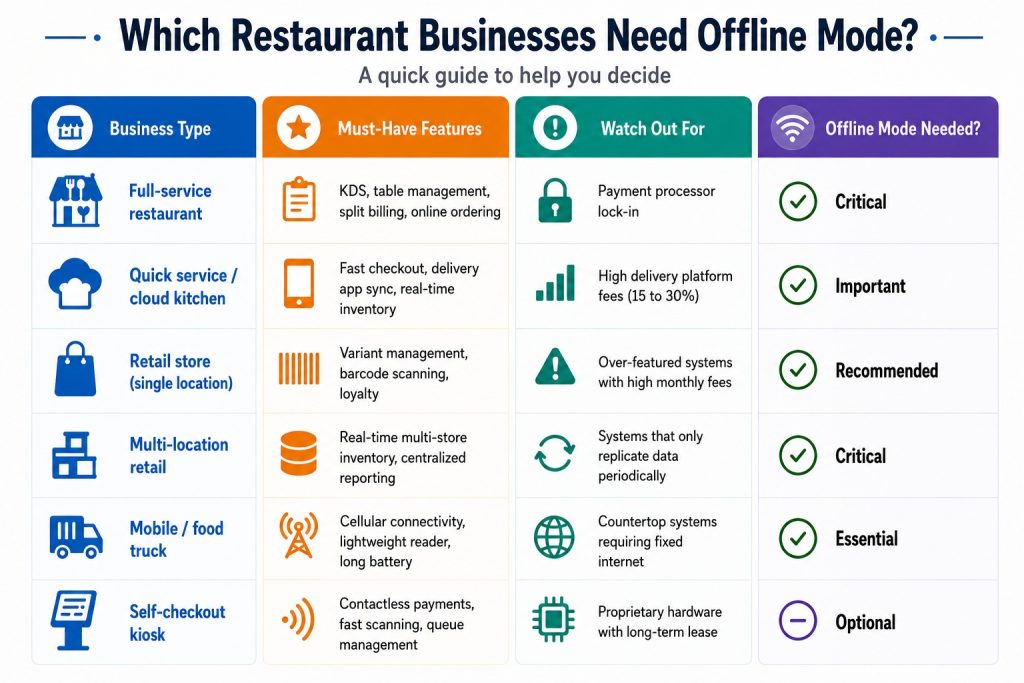
  4. Quick comparison table: what to look for by business type
  5. Red flags to watch out for
  6. Your pre-purchase evaluation checklist
  7. Frequently asked questions

What is a POS system, and why does your choice matter?

point-of-sale (POS) system is the central hub of your business operations. It processes transactions, tracks inventory, manages staff, generates reports, and connects your physical store to your online presence. In 2026, the best POS systems go far beyond just ringing up a sale.

The wrong POS system can lock you into high payment processing fees, limit your ability to scale, and cause operational chaos during peak hours. The right one pays for itself through better inventory control, faster checkout, and smarter business decisions. According to Statista, the global POS software market is projected to surpass $29 billion by 2028, reflecting how central these systems have become to modern retail and hospitality.

Cloud POS vs on-premise POS: which is right for you?

Before you compare specific systems, you need to decide on the architecture that fits your business. The two main types are cloud-based and on-premise POS. Each has real tradeoffs depending on your location, budget, and operational needs. Forbes Advisor consistently highlights cloud POS as the preferred choice for growing businesses due to its flexibility and lower upfront cost.

  • Cloud-based POS – Hosted online. Access anywhere. Auto-updates. Lower upfront cost. Ideal for multi-location businesses and remote monitoring.
  • On-premise POS – Installed locally. Higher upfront investment. Works offline without internet dependency. Better for high-security data environments.

Quick rule: If you have multiple locations or want to monitor sales remotely, cloud POS wins every time. LithosPOS is fully cloud-based and operates across 40+ countries with real-time sync. If you are in an area with unreliable internet, look for a system with a reliable offline mode.

The 8 must-evaluate criteria before buying any POS system

1. Real-time inventory management

Your POS must sync stock levels instantly across all locations, with sub-10-second updates during high-volume periods. Look for automated reorder triggers, SKU variant support, and multi-location dashboards. A system that only syncs periodically will cause overselling and stockouts. LithosPOS restaurant POS and retail POS both include real-time inventory tracking built into the core platform.

Ask vendors: Does your inventory update in real time across all registers and locations simultaneously, including during offline mode?

2. Payment processing flexibility

Some POS systems lock you into their own payment processor. On $50,000/month in card sales, this can cost you an extra $3,200 to $5,000 per year compared to choosing your own interchange-plus processor. Always ask whether you can bring your own merchant services provider. The PCI Security Standards Council recommends verifying your processor is fully PCI-DSS compliant before committing.

3. Hardware compatibility and cost

Avoid non-cancellable hardware leases. A $500 terminal on a 48-month lease can cost over $2,300 total. Look for systems that support industry-standard hardware (iPad, Android tablets, Sunmi/PAX terminals) or can reprogram your existing devices. Always buy hardware outright when possible. Check the LithosPOS pricing page to understand what hardware options are available with each plan.

4. Industry-specific features

Restaurant POS systems need table management, kitchen display systems (KDS), split billing, and online ordering. Retail POS systems need variant management (size/color/SKU), e-commerce sync, and loyalty programs. Never use a retail POS for a high-volume restaurant as the workflows are completely different and you will end up building costly workarounds.

5. Offline mode reliability

Even in 2026, internet outages happen. A reliable POS must queue transactions locally to a durable, journaled store that survives device restarts, not just in-memory. Verify that the system can process transactions for at least 4 to 8 hours offline and reconcile automatically when reconnected. Investopedia notes that offline capability is one of the most overlooked criteria during the POS evaluation process.

6. Reporting and AI-driven analytics

Modern POS systems now offer predictive inventory suggestions, staff performance analytics, and demand forecasting. Look for systems that tell you what you are going to sell, not just what you sold. This is now the fastest-growing area in retail and restaurant tech, with Gartner identifying AI-powered analytics as a top priority for operations leaders in 2026.

7. Third-party software compatibility

Your POS should not be an island. It must connect to your accounting software (QuickBooksXero), payroll tools, CRM, marketing platforms, and e-commerce stores. Verify every connection is native before signing any contract. LithosPOS supports a wide range of third-party tools out of the box.

8. Total cost of ownership (not just the monthly fee)

Beyond the software subscription, calculate menu/inventory upload fees, PCI compliance charges, hardware shipping, payment processing rates, and support tier costs. A system with a higher monthly fee but lower transaction rates often saves more money at scale. Review the LithosPOS pricing page for a transparent breakdown with no hidden fees.

Hidden costs to ask about: Setup fees, data migration charges, per-location pricing, transaction minimums, and contract cancellation penalties.

Quick comparison: what to prioritize by business type
Red flags to watch out for when comparing POS vendors

🛑 Unannounced in-person sales visits with “today only” pricing pressure

🛑 Rate quotes below 1.0% flat, as hidden fees almost always apply

🛑 Non-cancellable equipment leases (48-month leases are the worst deal in the industry)

🛑 No references from businesses in your industry with similar volume

🛑 Inventory that syncs “periodically” instead of in real time

🛑 Support teams are in the wrong time zone for your operating hours

Your pre-purchase POS evaluation checklist

✅ Define your must-have features before booking any demo

✅ Request a full cost breakdown: software, hardware, processing, and support

✅ Ask for a live demo of offline mode, not a slide deck explanation

✅ Test inventory sync speed across locations during a demo transaction

✅ Verify all promised connections are native, not middleware-dependent

✅ Ask for references from similar-sized businesses in your vertical

✅ Review the contract cancellation terms before signing anything

✅ Calculate your effective processing rate at your actual monthly volume

✅ Confirm data migration support is included, not a paid add-on

✅ Check PCI compliance tools are included in the plan, not separately billed

Ready to run through this checklist with a real system? Book a LithosPOS demo and we will walk you through every criterion live.

Frequently asked questions

1. What is the most important factor when choosing a POS system? Payment processing cost. Your POS is permanently tied to a payment processor that takes a cut of every single sale. A system with great features but locked-in high processing rates will cost you far more over time than a simpler system with flexible, competitive pricing. Before anything else, calculate your effective processing rate at your actual monthly card volume and compare it across vendors.

2. What is the difference between cloud POS and traditional POS? A cloud POS stores your data online and lets you access it from any device, anywhere. It updates automatically, has a lower upfront cost, and is ideal for businesses with multiple locations or remote monitoring needs. A traditional (on-premise) POS stores data locally on your own server, giving you full control and offline reliability but requiring a higher setup investment and in-house IT maintenance. For most modern businesses, cloud POS is the smarter long-term choice.

3. How much does a POS system cost per month? It depends on what your business needs. Basic POS software starts free for entry-level plans and scales to $40 to $400 per month for systems with inventory management, multi-location support, and advanced reporting. On top of that, factor in payment processing fees (typically 2.5 to 2.9% per transaction) and hardware costs. Always calculate the total cost of ownership, not just the software subscription fee.

4. Can a POS system work without internet? Yes, but not all systems handle it equally well. A reliable POS must queue transactions locally to a durable store that survives device restarts and auto-reconcile everything when the internet returns. Some systems marketed as offline capable only hold data in memory, meaning a reboot during an outage wipes your transaction queue. Always test offline mode live during your demo before committing.

5. What POS system is best for restaurants vs retail? They need completely different feature sets. A restaurant POS needs table management, kitchen display systems (KDS), split billing, course-by-course ordering, and delivery app sync. A retail POS needs SKU and variant management (size, color, style), barcode scanning, multi-location inventory, and e-commerce channel sync. Never use a generic or cross-purpose system for either as the workflow mismatch will create costly operational workarounds.

6. How do I avoid hidden fees when buying a POS system? Always ask for a full cost breakdown beyond the advertised software fee. Key things to ask about: menu or inventory upload fees, PCI compliance charges, hardware shipping costs, data migration fees, per-location pricing, and contract cancellation penalties. Then calculate your effective processing rate at your real monthly card volume, not the base rate shown in marketing materials. A legitimate vendor will give you all of this upfront without pressure.
Categories
Customer experience

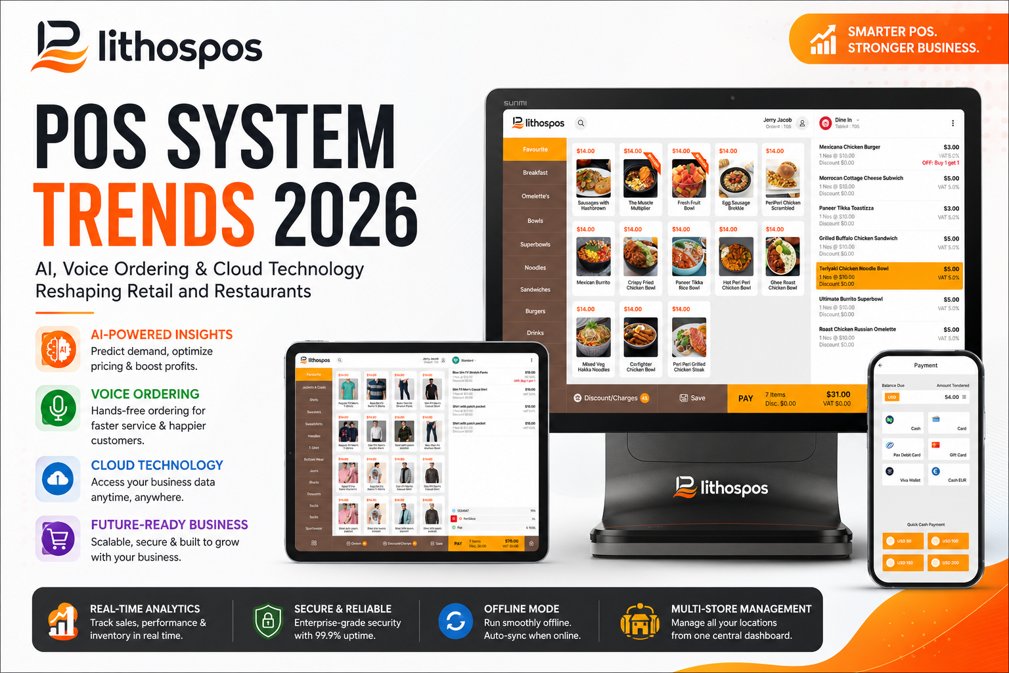
POS System Trends 2026: AI, Voice Ordering & Cloud Technology Reshaping Retail and Restaurants

The point-of-sale (POS) system is no longer just a cash register. In 2026, the best POS systems act as the central nervous system of modern retail stores and restaurants – managing inventory, analyzing customer behavior, processing omnichannel orders, and even predicting tomorrow’s sales.

Whether you run a quick-service restaurant (QSR), a fine-dining establishment, a grocery chain, or a retail boutique, the POS system you choose in 2026 directly impacts your revenue, efficiency, and customer experience.

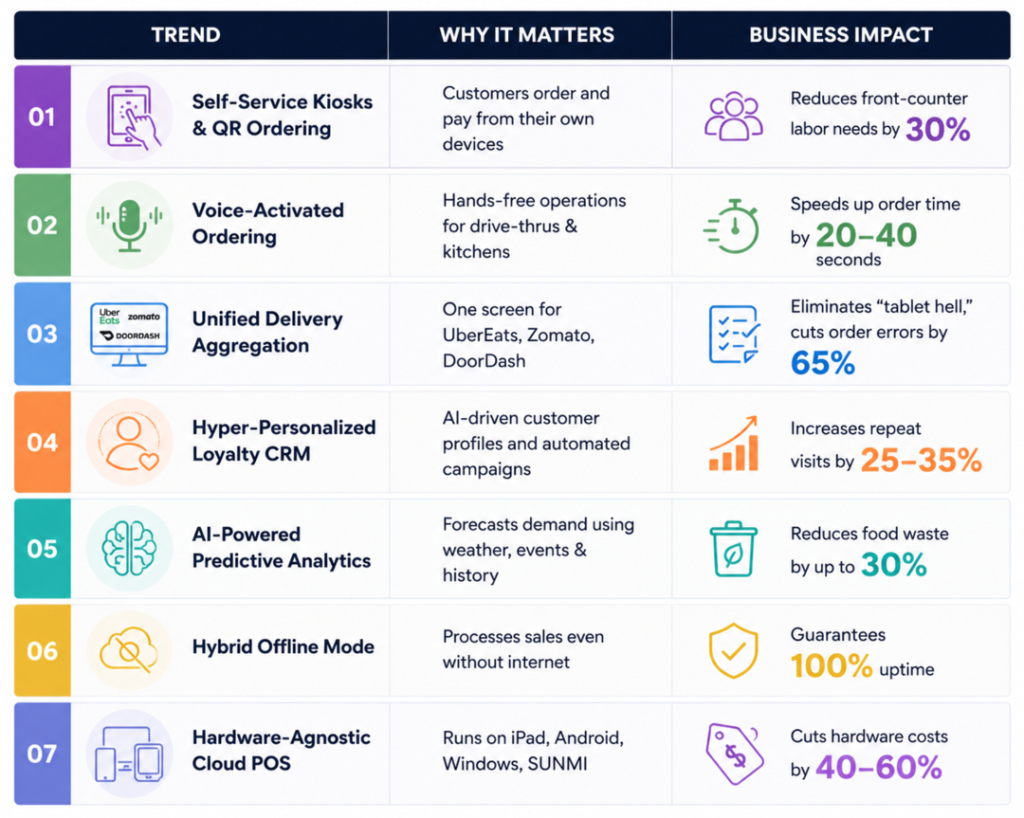
In this comprehensive guide, we break down the top 7 POS system trends for 2026, backed by industry data, and show you exactly how modern platforms like LithosPOS are leading this transformation.

What Are the Biggest POS System Trends for 2026?

The global point-of-sale terminal market is projected to reach $181.1 billion by 2030, growing at a CAGR of 9.9% (Grand View Research). This explosive growth is fueled by seven key technology shifts that are redefining what a POS system can do.

Here are the top POS trends every business owner needs to know in 2026:

1. AI-Powered POS Systems: From Data Collection to Predictive Action

How is AI changing POS systems in 2026?

Short answer: AI transforms your POS from a system that tells you what happened yesterday into one that tells you what will happen tomorrow and automatically takes action.

In 2026, the best AI-powered POS systems analyze massive datasets combining your historical sales, external factors like weather forecasts, local events, public holidays, and even social media trends to deliver predictive insights in real time.

According to Juniper Research, AI-driven automation in retail will save businesses over $340 billion annually by 2028 through smarter inventory management and dynamic pricing.

How AI-Powered POS Helps Restaurants

Imagine your restaurant POS system automatically alerting your kitchen manager:

“Cold front expected this Saturday. Based on last year’s data, soup and hot beverage orders increased by 22%. Recommend prepping 20% extra.”

AI also enables dynamic menu pricing, slightly adjusting prices during peak and off-peak hours based on real-time demand, similar to how ride-sharing apps operate.

How AI-Powered POS Helps Retail

For retail businesses, AI solves the two biggest profit killers: stockouts and dead stock.

  • Stockout Prevention: The POS automatically generates purchase orders when inventory drops below a predicted threshold, not a static reorder point, but a dynamic one based on seasonal demand curves.
  • Dead Stock Reduction: AI flags slow-moving products early and suggests targeted discount campaigns before items become total losses.

How LithosPOS Uses AI

LithosPOS leverages advanced analytics and smart dashboard reporting to deliver actionable, real-time insights. From automated low-stock alerts to sales trend forecasting across multiple store locations, LithosPOS ensures your inventory is always optimized without the manual guesswork.

2. Voice-Activated POS: Conversational Commerce Enters the Kitchen

What is voice ordering in POS systems?

Short answer: Voice-activated POS technology allows restaurant staff and customers to place orders, check inventory, and manage operations using natural speech, with no screen tapping required.

We already talk to Alexa and Siri at home. In 2026, voice AI is making a massive leap into commercial POS environments.

Voice AI in Drive-Thrus and Quick-Service Restaurants

Quick-service restaurant (QSR) chains are rapidly deploying conversational AI bots at drive-thru windows.

These systems:

  • Take orders accurately through natural language processing (NLP)
  • Perfectly execute upselling prompts: “Would you like to add a medium fry for just $1.50 more?”
  • Never forget an order modification
  • Pass completed tickets directly to the Kitchen Display System (KDS) in under 2 seconds

According to PYMNTS.com, drive-thru voice AI reduces average order time by 20-40 seconds per car, translating to significantly higher throughput during peak hours.

Hands-Free Staff Operations

In busy restaurant kitchens and retail stockrooms, staff can now:

  • Check real-time inventory levels by voice
  • Update order statuses hands-free
  • Clock in and out without touching a screen
  • Call up customer profiles during table-side service

This reduces screen dependency, speeds up operations, and improves hygiene, a growing priority in food service according to the National Restaurant Association.

3. Unified Delivery Aggregation: The End of “Tablet Hell.”

What is tablet hell in restaurants?

Short answer: “Tablet hell” refers to restaurants juggling 3-5 separate tablets for different delivery platforms (Uber Eats, DoorDash, Zomato, Grubhub, and more), each with its own interface, alert sounds, and manual order re-entry leading to errors, delays, and chaos.

In 2026, omnichannel POS integration is no longer a luxury feature. It is a baseline requirement for any serious restaurant or retail operation.

How Modern POS Systems Solve Tablet Hell

The best restaurant POS systems in 2026 feature direct API integrations with all major third-party delivery platforms.

Here is how it works:

  1. A customer orders through Uber Eats, DoorDash, or Zomato
  2. The order bypasses the front counter entirely
  3. It flows directly into the POS and prints on the KDS
  4. Kitchen staff prepare it just like a dine-in order, no manual re-entry

A McKinsey & Company report found that restaurants using unified order management reduce order errors by up to 65% and increase delivery throughput by 30%.

Centralized Menu Management

When you run out of avocado or a seasonal item, you update it once in your POS. The change instantly syncs across all connected delivery platforms, your website, and your self-service kiosks. No more logging into four different dashboards.

How LithosPOS Solves Tablet Hell

LithosPOS connects your business to 50+ integrations from delivery aggregators (Uber Eats, Zomato, Talabat, Deliveroo) to enterprise accounting platforms (SAP, Oracle, Zoho Books) and local payment gateways. Every order, from every channel, arrives on one single screen.

4. Hardware-Agnostic Cloud POS: The End of Vendor Lock-In

What is a hardware-agnostic POS system?

Short answer: A hardware-agnostic POS is software that runs on any device, iPads, Android tablets, Windows PCs, or industry-specific hardware like SUNMI and PAX, without requiring proprietary equipment from the POS vendor.

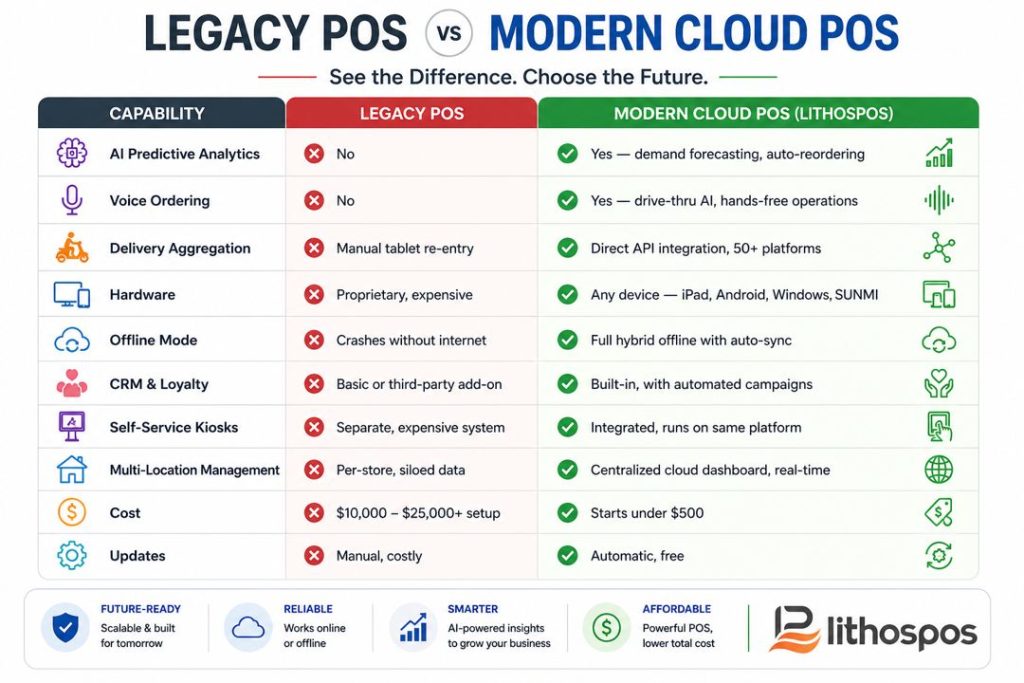
For decades, legacy POS companies forced merchants into buying their expensive, proprietary hardware. If a screen broke, you had to order their specific $1,500 replacement. If you wanted to open a new location, hardware costs could run into tens of thousands of dollars.

Why Hardware-Agnostic POS Matters in 2026

The biggest shift in the point-of-sale industry in 2026 is the widespread demand for Bring Your Own Device (BYOD) capability. According to Statista, cloud POS adoption has grown by over 300% since 2020, driven primarily by small businesses seeking affordable alternatives to proprietary terminals.

How LithosPOS Delivers Hardware Freedom

LithosPOS is 100% hardware-agnostic. Run our software on the Apple iPad, any Android tablet, a Windows desktop, or specialized restaurant hardware like SUNMI devices. You get enterprise-grade POS performance without the enterprise-grade price tag, giving you absolute freedom to scale without hardware lock-in.

5. Hyper-Personalized Loyalty Programs and CRM

How do modern POS systems handle customer loyalty?

Short answer: In 2026, the best POS systems include built-in Customer Relationship Management (CRM) tools that create detailed customer profiles, track purchase history, and trigger automated, hyper-personalized marketing campaigns, replacing generic punch cards forever.

The era of “buy 10, get 1 free” punch cards is over. Today’s consumers expect businesses to know them.

What Hyper-Personalized Loyalty Looks Like

When a regular customer walks into your coffee shop or logs into your digital ordering app, your POS should instantly pull up their profile:

“Hi Sarah, your usual iced oat milk latte? You’ve earned a $5 reward want to apply it today?”

This level of recognition builds emotional loyalty, not just transactional loyalty.

Automated Retention Marketing

Modern POS-integrated CRM tracks exactly what a customer buys and when.

Powerful automations include:

  • Predictive Reorder Reminders: If a customer buys pet food every 4 weeks, the system sends an SMS reminder at week 3 with a 10% discount code.
  • Lapsed Customer Win-Back: If a regular hasn’t visited in 30 days, trigger an automated email with a personalized offer on their favorite items.
  • Birthday and Anniversary Rewards: Automatic special offers on key dates.
  • Tiered VIP Programs: Customers automatically level up based on spending, unlocking exclusive perks.

According to Bain & Company, increasing customer retention by just 5% can boost profits by 25-95%. A POS with built-in CRM is the most direct path to achieving this.

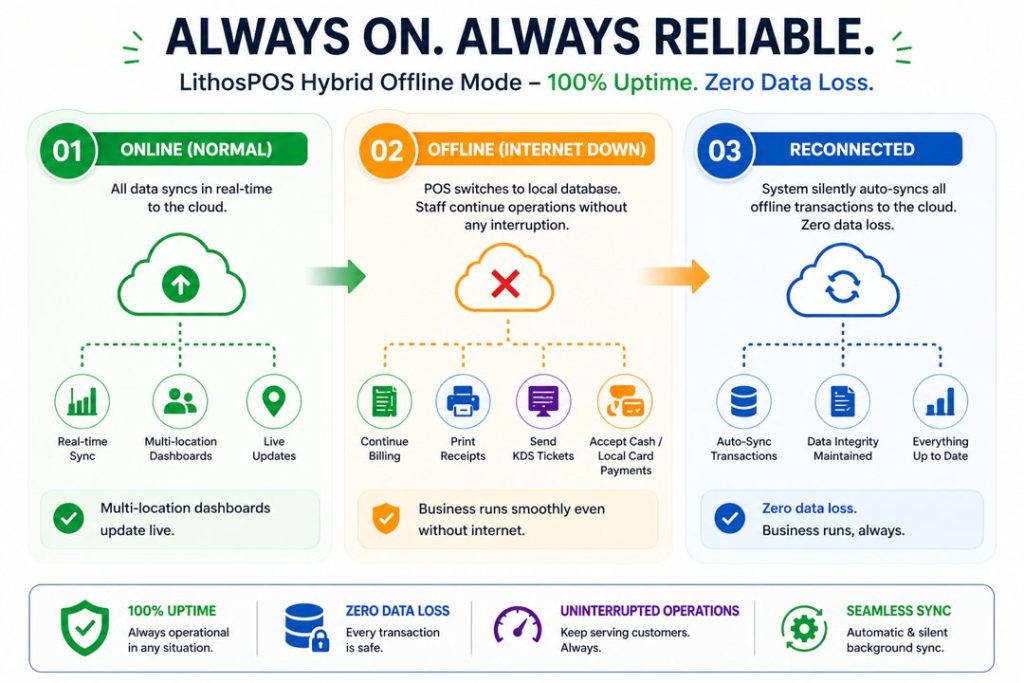
6. Hybrid Offline Mode: Zero Downtime, Zero Excuses

What happens when a cloud POS loses internet?

Short answer: With a hybrid offline POS, nothing happens — business continues as normal. The system processes sales, prints receipts, and sends orders to the kitchen using a local database. When the internet returns, everything auto-syncs to the cloud.

As the industry shifted to cloud-based POS systems, a critical vulnerability emerged: internet dependency. For a busy retail store or a packed Friday-night restaurant, an internet outage used to mean a complete business shutdown.

In 2026, businesses refuse to accept downtime. The industry standard is now the Hybrid Offline Mode.

How Hybrid Offline POS Works

Why This Matters for Global Businesses

For businesses operating in regions with inconsistent internet infrastructure, such as Southeast Asia, the Middle East, Africa, island nations, and developing markets, a hybrid offline capability is not a feature. It is a survival requirement. The World Bank Digital Development reports that over 2.7 billion people still lack reliable broadband, making offline-capable systems essential for global commerce.

How LithosPOS Guarantees Uptime

LithosPOS was purpose-built with island and developing-market infrastructure in mind. Our Hybrid Offline Mode guarantees 100% operational uptime. Your staff can open the cash drawer, print receipts, process orders, and send tickets to the KDS even with zero internet. The moment connectivity returns, all data syncs seamlessly. Your business never stops, even when your internet provider does.

7. Self-Service Kiosks and QR Code Mobile Ordering

What is self-service ordering in restaurants and retail?

Short answer: Self-service ordering allows customers to browse menus or product catalogs, place orders, and complete payments entirely on their own using in-store kiosks, their own smartphones via QR codes, or mobile apps without waiting for staff assistance.

The self-service revolution that began in major fast-food chains has now reached mid-sized restaurants, boutique retail stores, and grocery chains. Customers in 2026 prioritize speed and control over their ordering experience.

Self-Checkout in Retail

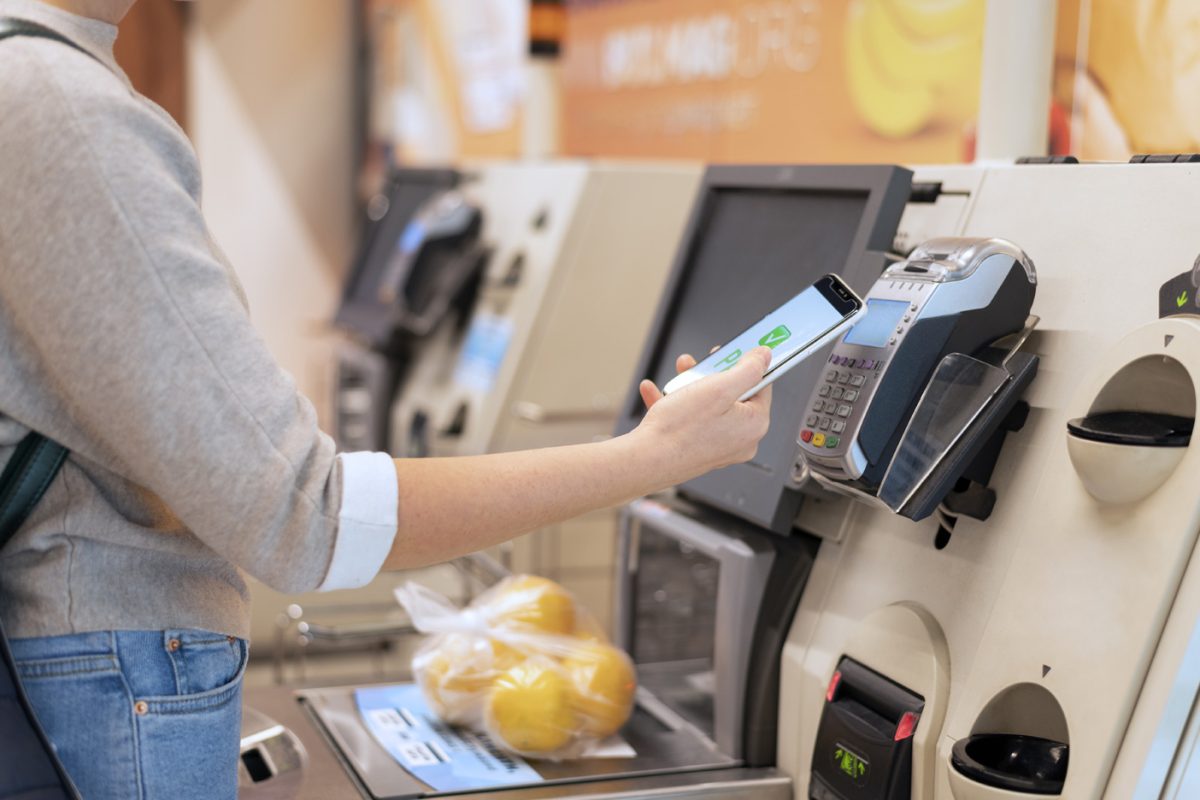
More retail stores, from boutiques to grocery chains, are deploying tablet-based self-checkout kiosks that require minimal staff intervention. Combined with AI-assisted cameras for loss prevention, these kiosks deliver a fast, frictionless checkout experience. According to RBR Data Services, the number of self-checkout terminals globally is expected to exceed 2 million units by 2027.

QR Code 2.0: Interactive Mobile Ordering for Restaurants

The static PDF QR code menus from the pandemic era have evolved into fully interactive digital ordering experiences:

  1. The customer sits down and scans the QR code on the table
  2. A rich, visual menu loads on their smartphone (no app download required)
  3. They browse, customize, and send their order directly to the bar or kitchen
  4. They pay using Apple Pay, Google Wallet, or any digital payment method 5. The entire experience happens without waiting for a server
  5. The entire experience happens without waiting for a server

Does Self-Service Replace Staff?

No. Self-service doesn’t eliminate hospitality; it enhances it. By offloading transactional tasks (taking orders, processing payments) to the customer, your team is freed to focus on what humans do best: providing exceptional service, upselling, and managing the floor. Harvard Business Review research confirms that businesses combining self-service technology with attentive human staff report the highest customer satisfaction scores.

Frequently Asked Questions (FAQ)

What is the best POS system for restaurants in 2026?

The best restaurant POS system in 2026 should offer AI-powered analytics, unified delivery aggregation (Uber Eats, DoorDash, Zomato on one screen), a Kitchen Display System, hybrid offline mode, and hardware-agnostic deployment. LithosPOS checks all these boxes and supports 50+ integrations out of the box.

How does the free trial of LithosPOS work?

You can try all Lithospos’s features free for 14 days. There’s no commitment. We won’t ask for your credit card or payment information.

Can a POS system work without internet?

Yes. Modern hybrid POS systems like LithosPOS operate on a dual architecture, cloud-first with a robust local database. If the internet drops, you continue processing sales, printing receipts, and managing orders. All data auto-syncs when connectivity returns. Learn more about LithosPOS offline mode.

What is the difference between a cloud POS and a legacy POS?

A legacy POS stores data locally on proprietary hardware, requires manual updates, and cannot integrate easily with delivery platforms or modern payment methods. A cloud POS like LithosPOS stores data in the cloud, updates automatically, runs on any device, and integrates with 50+ third-party platforms, including delivery apps, accounting software, and payment gateways.

Is voice ordering the future of POS?

Voice ordering is one of the fastest-growing POS trends in 2026, especially in drive-thru and quick-service environments. AI-powered voice bots reduce order time by 20-40 seconds per transaction and improve upselling consistency. Gartner predicts that by 2028, over 30% of all QSR orders will involve some form of voice AI assistance.

What is a hardware-agnostic POS?

A hardware-agnostic POS is software that runs on any device, iPads, Android tablets, Windows PCs, or industry hardware like SUNMI and PAX, without requiring proprietary equipment. This gives business owners the freedom to use affordable, off-the-shelf devices instead of expensive vendor-locked terminals.

Conclusion: Is Your Business Ready for the Future of POS?

The point-of-sale industry in 2026 has moved from transactional to transformational. AI predictive analytics, voice ordering, hardware freedom, hybrid offline reliability, and omnichannel delivery integration all point toward one goal: making your business faster, more resilient, and more profitable.

If your current POS system forces you into expensive hardware, crashes when the internet drops, or requires manual order re-entry from delivery tablets, you are losing money every single day.

It is time to upgrade.

LithosPOS is a cloud-based, hardware-agnostic POS platform purpose-built for modern retail and restaurant businesses across 40+ countries. With true Hybrid Offline Mode, AI-powered analytics, 50+ integrations, and deployment on any device, LithosPOS gives you the power of tomorrow – today.

Ready to future-proof your business?

Book a Free Demo with LithosPOS and see how 50,000+ businesses worldwide are already running on the future of point-of-sale technology.

Categories
Customer experience kiosks

Self-Checkout vs Traditional Checkout: Which Is Right for Your Retail Business?

The checkout experience can make or break a customer’s entire shopping journey. Over the past few years, retailers have been asking themselves one critical question: Should we invest in self-checkout technology or stick with traditional staffed checkouts? The answer isn’t black and white, but understanding the differences between these two approaches will help you make the right decision for your business.

The Rise of Self-Checkout Technology

Self-checkout systems have exploded in popularity since the early 2000s. What started as a novelty in supermarkets has now become a standard feature in retail stores, fast-casual restaurants, and even some grocery chains worldwide. According to recent industry reports, the global self-checkout market is expected to reach over $10 billion by 2030.

But here’s the thing, self-checkout isn’t a one-size-fits-all solution. Some retailers have embraced it wholeheartedly, while others have pulled back due to concerns about theft and customer satisfaction. Understanding both the strengths and weaknesses of self-checkout versus traditional checkout will help you decide what makes sense for your business.

What Is Self-Checkout, and How Does It Work?

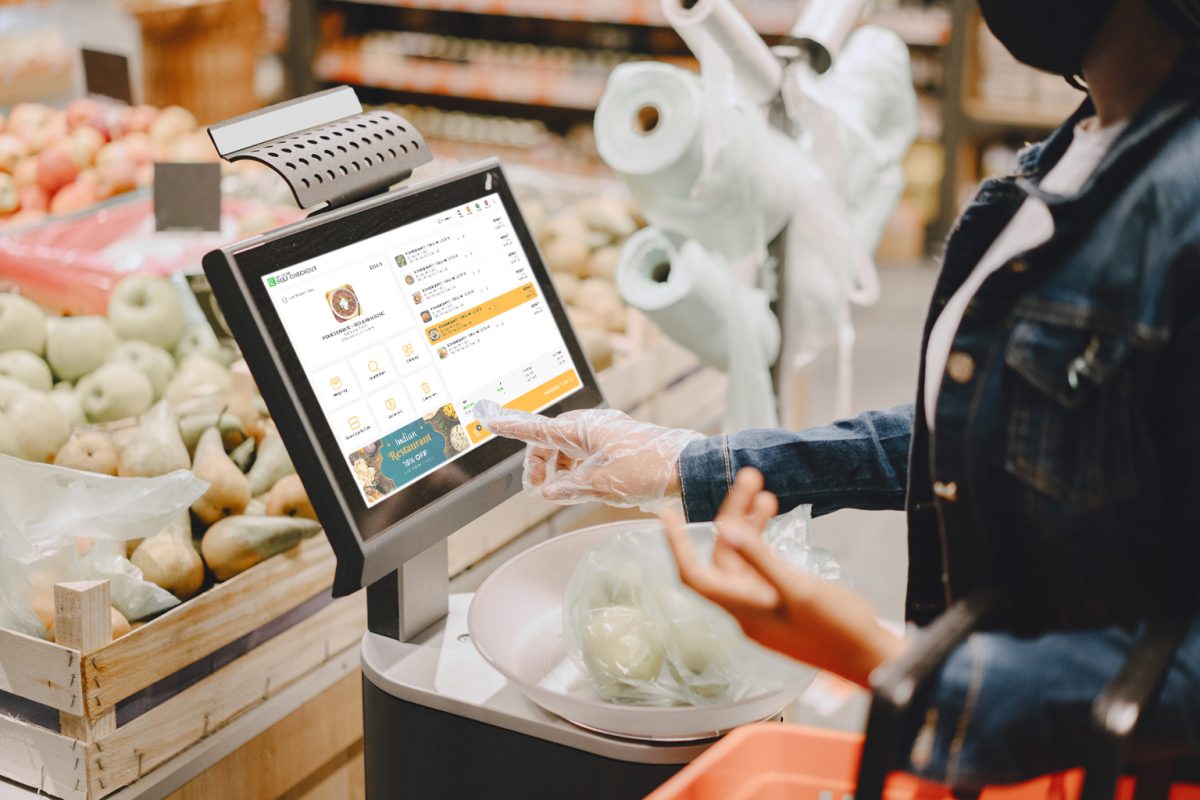
Self-checkout systems allow customers to scan items, process payments, and complete their purchase without assistance from a cashier. Modern self-checkout solutions like LithosPOS Self-Checkout use advanced technology, including barcode scanning, touchscreen interfaces, weight sensors, age verification, and integrated payment processing.

LithosPOS Self-Checkout offers features specifically designed to create a frictionless checkout experience:

  • Intuitive Touchscreen Interface: Customers can easily navigate through the checkout process with clear prompts and instructions
  • Fast Payment Processing: Multiple payment methods including cards, mobile payments, and digital wallets
  • Real-Time Inventory Integration: Tracks sales data as items are scanned, updating inventory automatically
  • Age-Restricted Item Detection: Automatic verification for items like alcohol and age-gated products
  • Receipt Options: Digital or printed receipts based on customer preference
  • Multi-Language Support: Accommodates diverse customer bases
  • Analytics and Reporting: Detailed insights into transaction patterns and peak times

These features work together to create a more independent shopping experience while maintaining security and accuracy.

Understanding Traditional Checkout

Traditional checkout is the classic model we’ve all experienced: customers line up with their items, a cashier scans everything, the customer pays, and they leave. It’s straightforward, personal, and has been the retail standard for decades. Traditional checkout still has several advantages that keep it relevant:

  • Personal Interaction: Cashiers can provide customer service, answer questions, and offer product recommendations
  • Accessibility: It’s easier for elderly customers, those unfamiliar with technology, or people with disabilities
  • Handling Complex Transactions: Returns, refunds, and special requests are easier with a trained employee
  • Building Customer Relationships: Regular customers appreciate familiar faces and personal connections
  • Premium Service Feel: Some retailers use checkout as an opportunity to deliver exceptional service

For many years, traditional checkout was simply the way retail worked. And in many settings, it still works beautifully.

Self-Checkout vs Traditional Checkout: A Detailed Comparison

1. Speed and Efficiency

  • Self-Checkout: Self-checkout is often faster for customers purchasing small quantities of items. There’s no waiting in line, and customers move at their own pace. However, unexpected item issues (like age verification for alcohol or weight sensor problems) can slow things down.
  • Traditional Checkout: For large basket sizes, traditional checkout can actually be faster since a trained cashier scans items at a consistent, quick pace. But during peak hours, customers face waiting times in checkout lines, which is one of the biggest pain points in retail.
  • Winner: Self-checkout for small purchases and off-peak hours; traditional checkout for large baskets and trained efficiency.

2. Customer Satisfaction

  • Self-Checkout: Satisfaction varies widely. Customers who are tech-savvy and buying just a few items love it. But frustration sets in quickly when the weight sensor malfunctions, items require age verification, the interface isn’t intuitive, or technical glitches occur. Modern solutions like LithosPOS Self-Checkout address many of these issues with user-friendly interfaces and quick staff assistance buttons.
  • Traditional Checkout: Customer satisfaction tends to be higher when cashiers are friendly and knowledgeable, wait times are minimal, the cashier remembers regular customers, and there’s genuine customer service. The downside? Long lines during busy periods kill satisfaction scores.
  • Winner: Traditional checkout for overall satisfaction, but modern self-checkout systems are closing the gap.

3. Cost Considerations

  • Self-Checkout: Initial investment is significant; self-checkout kiosks can be costly depending on features and capabilities. Installation and maintenance add ongoing costs. However, you reduce labor costs since fewer cashiers are needed.
  • Traditional Checkout: Lower upfront costs for the checkout counter itself, but labor costs are your biggest expense. A full-time cashier earning $15/hour with benefits costs roughly $30,000-$40,000 annually. A store might need 5-10 cashiers, depending on size and hours.
  • Winner: For high-volume stores, self-checkout wins on long-term cost savings. For small shops with low transaction volumes, traditional checkout is more cost-effective.

4. Theft and Shrinkage

  • Self-Checkout: This is where self-checkout faces serious challenges. Studies show that shrinkage (loss from theft or mistakes) at self-checkout is often higher than traditional checkouts. Customers accidentally miss scanning items, and some deliberately bypass scanning. The LithosPOS Self-Checkout system addresses this with weight sensors and AI-powered item detection, but the issue persists across the industry.
  • Traditional Checkout: Trained cashiers catch mistakes and suspicious behavior naturally. Shrinkage is lower because there’s immediate accountability.
  • Winner: Traditional checkout for loss prevention, though modern self-checkout systems are improving.

5. Customer Demographics and Accessibility

  • Self-Checkout: Works best for tech-savvy customers, people buying small quantities, customers in a hurry, and younger demographics. Doesn’t work well for elderly customers unfamiliar with technology, people with disabilities, non-English speakers, or those buying large quantities.
  • Traditional Checkout: Accessible for virtually everyone. Cashiers can slow down, explain steps, and accommodate different needs.
  • Winner: Traditional checkout for accessibility and inclusivity.

6. Upselling and Customer Engagement

  • Self-Checkout: There’s a limited opportunity for upselling or customer engagement, as customers typically scan items and complete their purchase quickly. However, LithosPOS addresses this by offering intelligent product suggestions and frequently bought together recommendations, helping businesses drive upsells seamlessly during the billing process.
  • Traditional Checkout: Skilled cashiers can recommend complementary products, mention promotions, or suggest seasonal items.
  • Winner: Traditional checkout for relationship-building and upselling. LithosPOS addresses this by offering intelligent suggestions and frequently bought together recommendations.

7. Labor and Staffing

  • Self-Checkout: Reduces the number of cashiers needed. However, you still need staff to monitor kiosks, assist customers, verify ages, and handle exceptions.
  • Traditional Checkout: Requires consistent staffing and creates scheduled employment.
  • Winner: Self-checkout for reducing staffing during labor shortages; traditional checkout for providing jobs.

The Real-World Trade-Offs

Here’s what most successful retailers have learned: it’s not about choosing one or the other, it’s about finding the right mix for your business. Grocery stores and supermarkets typically use 70-80% self-checkout and 20-30% traditional checkout. Quick-service restaurants lean heavily on self-ordering kiosks and self-checkout. Luxury retail stores often skip self-checkout entirely, preferring high-touch customer service. Small independent retailers typically stick with traditional checkout because the investment doesn’t pay off with their transaction volumes.

What Does the Future Look Like?

Self-checkout technology is improving rapidly. AI-powered item recognition is becoming more accurate. Biometric payments and mobile integration are making the process faster. Voice-activated checkouts are emerging. Modern platforms like LithosPOS Self-Checkout are continuously updating to address customer pain points. At the same time, some retailers are pulling back from pure self-checkout, recognizing that human interaction still matters, especially as a competitive advantage in an increasingly digital world.

Making the Right Choice for Your Business

Choose self-checkout if you have:

  • High transaction volume with small basket sizes
  • Young, tech-savvy customer base
  • Significant labor costs or labor shortages
  • Multiple locations where standardization matters
  • Budget for initial investment and ongoing maintenance
  • Ability to monitor kiosks and prevent theft

Stick with traditional checkout if you have:

  • Low transaction volume
  • Large average basket sizes
  • Older customer demographic
  • Limited budget for new technology
  • Strong emphasis on customer service and relationships •
  • Complex transactions (returns, special orders)
  • Need for high accessibility and inclusivity

Use a hybrid approach if you have:

  • Medium to high transaction volume
  • Mixed customer demographics
  • Budget for both solutions
  • Ability to staff and maintain both systems
  • Desire to accommodate different customer preferences

Implementing Self-Checkout Successfully

If you decide self-checkout is right for your business, here’s what success looks like:

1. Choose the right platform: LithosPOS Self-Checkout is designed specifically for retail and food service businesses.

2. Train staff properly: Your monitoring staff needs to be customer-service oriented.

3. Monitor and adjust: Track shrinkage data, customer satisfaction scores, and transaction times.

4. Communicate clearly: Let customers know where self-checkout is available and how to use it.

5. Maintain the technology: Regular software updates and hardware maintenance are critical.

The Bottom Line

Self-checkout and traditional checkout aren’t competitors; they’re different tools for different situations. The best retail experiences offer customers choice and flexibility. Technology like LithosPOS Self-Checkout has made self-service faster, more reliable, and more customer-friendly than ever before. But it works best alongside traditional checkout, not as a replacement for it.

The future of retail checkout isn’t about picking a winner. It’s about understanding your customers, your business model, and your capabilities, and choosing the approach that best serves them. Your customers are already voting with their feet. Watch where they go, listen to their feedback, and be willing to adapt. That’s the real secret to checkout success.

Ready to explore self-checkout for your business?

If you’re considering implementing self-checkout in your retail or food service operation, LithosPOS Self-Checkout offers advanced features designed specifically for modern retailers. Learn more about features like real-time inventory integration, age verification, payment processing, and detailed analytics by visiting LithosPOS Self-Checkout. Whether you choose self-checkout, traditional checkout, or a hybrid approach, the goal is the same: making your customers’ experience faster, easier, and more enjoyable.

Categories
Restaurant POS Retail POS

Loyverse vs Fudo vs LithosPOS: Which is the Best POS software for your Business in 2026?

Choosing the wrong Point of Sale (POS) software can cost you thousands of dollars in lost inventory, compliance fines, and customers frustrated by slow checkout lines. If you’re reading this, you are likely looking for an alternative to Loyverse, evaluating Fudo, or dealing with outdated, clunky legacy systems.

In 2026, a POS software is no longer just a “cash register.” It is the financial engine of your business. It must handle multiple locations effortlessly, continue processing sales even without the internet, and integrate seamlessly with your accounting and e-commerce platforms.

In this definitive guide, we compare Loyverse, Fudo, and LithosPOS to help you make the right choice for your retail store or restaurant.

The Hidden Cost of “Free” POS software

Many business owners start with freemium applications like Loyverse. It’s free to start and easy to download on an iPad. However, as your business grows and you open a second or third location, you hit a glass ceiling:

  • The Integration Nightmare: Global freemium solutions rarely offer deep, native integrations with local accounting systems or electronic invoicing mandates. You end up paying for expensive third-party connectors like Zapier or entering data manually.
  • Non-Existent VIP Support: When your system crashes on a busy Friday night, you cannot rely on a community forum or an email ticket that takes 48 hours to resolve. You need immediate human help.
  • Lack of True “Offline Mode”: If the internet drops, your business stops. Basic systems won’t let you print kitchen tickets or close secure payments offline. A true offline POS is essential.

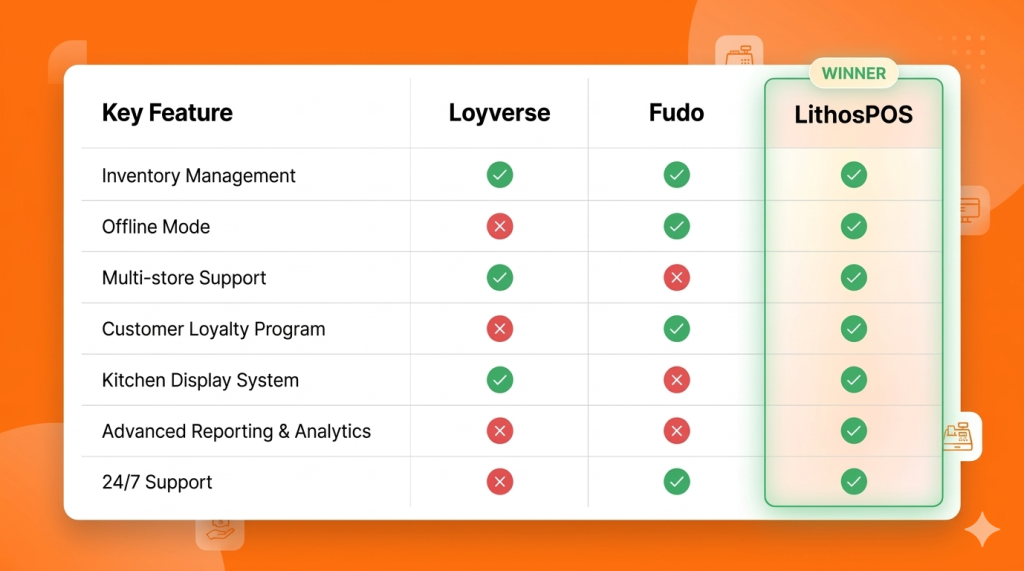
POS software Comparison Matrix (2026)

This table summarizes the key differences between the top POS alternatives.

Deep Dive: Which software should you choose?

1. Loyverse: Best for Hobbyists and Pop-ups

The Verdict: Loyverse is an excellent global freemium POS for one-person businesses, mobile coffee carts, or temporary pop-up shops. However, it lacks vital B2B features like advanced matrix inventory and real-time enterprise support.

  • The Best Part: It is free to start, and the interface is very user-friendly.
  • The Catch: “Free” becomes expensive when you need real accounting integrations, warehouse management for 3+ locations, or emergency phone support.

2. Fudo: Strong in Restaurants, Weak in Multi-Store Retail

The Verdict: Fudo is a specialized management software for gastronomy. It is a solid choice if you only operate a single, small restaurant.

  • The Best Part: The interface is designed specifically for restaurant workflows (tables, waiters, kitchen routing).
  • The Catch: If your business is mixed (e.g., a bakery that also sells packaged retail goods), Fudo falls short in matrix inventory management and warehouse transfers. It is not built to scale complex retail operations.

3. LithosPOS: The Growth Engine for Scaling Businesses

The Verdict: LithosPOS is the ultimate comprehensive POS system for scaling businesses in 2026. It combines a modern, sleek cloud interface with a powerful multi-store engine and a true “Offline Mode.”

  • Unbreakable Offline Mode: Unlike the competition, if your internet provider fails, LithosPOS keeps billing, printing kitchen tickets, and securely storing data to sync automatically when the connection returns. You never lose a sale. Learn more about our offline POS capabilities.
  • Total Multi-Store Control: Whether you have 2 or 50 locations, LithosPOS lets you view real-time inventory across all stores, execute stock transfers, and analyze centralized reports right from your phone using the Smart Dashboard app.
  • Limitless Integrations: With over 50+ payment gateways, accounting integrations (QuickBooks, SAP, OracleERP), and e-commerce syncing, LithosPOS fits perfectly into your existing tech stack.
  • Support That Understands Your Business: When your POS is the heart of your operation, you need experts available 24/7, not a help forum.

Conclusion:

When is it time to migrate to LithosPOS?

If your business is losing sales due to slow software, you are bleeding money from inventory shrinkage (“employee theft”) due to poor stock tracking, or you are stressed about accounting and invoicing compliance… it is time to leave free apps and legacy software behind.

LithosPOS is built for small business owners who demand frictionless growth, total inventory control, and operational peace of mind.

Ready to scale your business in 2026? Don’t just take our word for it. Speak with one of our implementation experts and discover exactly how LithosPOS can automate your operations today.

Book a Free Demo and Talk to an Advisor Today

Categories
Customer experience Restaurant Restaurant POS

5 Costly Mistakes Cloud Kitchens Make Without the Right POS Software

The cloud kitchen industry has grown rapidly over the past few years. With lower setup costs and the rising demand for online food delivery, many entrepreneurs are launching delivery-only restaurants. However, running a successful cloud kitchen requires more than just great food and delivery partners. Behind every efficient operation is strong technology, especially a reliable POS software.

Without the right POS solution, cloud kitchens often face operational challenges that can slow down growth, create confusion, and impact customer satisfaction. Many businesses underestimate the importance of a smart POS platform until problems begin to appear.

Here are five costly mistakes cloud kitchens make when they operate without the right POS software like LithosPOS.

1. Struggling to Manage High Order Volumes

Cloud kitchens often receive orders from multiple online channels at the same time. During peak hours, managing these orders manually or through disconnected systems can quickly become overwhelming.

Without a proper POS platform, staff may need to switch between different dashboards or devices to track incoming orders. This increases the chances of missed orders, delays, and confusion in the kitchen.

A modern POS solution centralizes all orders in one place, allowing kitchen teams to manage incoming requests smoothly. This improves workflow, reduces stress during rush hours, and ensures every order is processed correctly.

2. Frequent Order Errors and Customer Complaints

Accuracy is critical in the food delivery business. If customers receive the wrong item or a missing order component, it can lead to negative reviews and loss of trust.

Cloud kitchens that rely on manual order handling are more likely to experience errors. Staff may misread orders, forget modifications, or enter incorrect details.

POS software helps eliminate these issues by displaying orders clearly and sending them directly to the kitchen workflow. Some solutions also integrate with kitchen display systems, ensuring chefs see exactly what needs to be prepared.

This structured approach helps reduce mistakes and improve overall order accuracy, leading to better customer experiences.

3. Poor Inventory Management

Inventory management is one of the most overlooked areas in cloud kitchen operations. When stock levels are not tracked properly, businesses may run out of ingredients unexpectedly or overstock items that expire quickly.

Without a POS platform tracking ingredient usage and sales patterns, managers often rely on guesswork when planning purchases.

Smart POS solutions automatically track product sales and update inventory levels in real time. This helps cloud kitchens maintain the right balance of stock, reduce food wastage, and make informed purchasing decisions.

Better inventory visibility also ensures that menu items remain available for customers, preventing lost sales.

4. Lack of Data for Business Decisions

Many cloud kitchens operate without clear insights into their performance. Owners may know how many orders they receive daily, but they often lack deeper data about sales trends, popular menu items, or peak ordering times.

Without analytics, it becomes difficult to make strategic decisions that drive growth.

POS software collects and organizes business data automatically. It allows operators to track metrics such as top-selling items, revenue patterns, and order trends.

These insights help cloud kitchen owners adjust menus, optimize pricing strategies, and plan marketing campaigns based on real data rather than assumptions.

In a competitive market, data-driven decisions can make a major difference.

5. Difficulty Scaling the Business

One of the biggest advantages of the cloud kitchen model is scalability. Many businesses start with one brand and later expand to multiple virtual brands or additional locations.

However, scaling operations becomes difficult when the technology infrastructure is not built for growth.

Without the right POS platform, managing multiple brands, menus, or locations can become complicated. Business owners may struggle to monitor performance across different operations or maintain consistency.

A modern POS solution provides centralized control over multiple brands and outlets. It allows operators to manage menus, track sales, and monitor operations from a single dashboard.

This flexibility makes expansion smoother and helps cloud kitchens grow without losing operational control.

Why the Right POS Software Matters for Cloud Kitchens

Cloud kitchens rely heavily on speed, accuracy, and efficiency. Unlike traditional restaurants, they operate in a digital-first environment where every order flows through online platforms.

A powerful POS solution acts as the backbone of the entire operation. It connects orders, inventory, kitchen workflows, and sales data into one organized system.

By adopting a POS software like LithosPOS, cloud kitchen operators can simplify daily operations, reduce errors, improve order management, and make better business decisions.

Final Thoughts

The success of a cloud kitchen depends not only on food quality but also on how efficiently operations are managed. Businesses that rely on outdated systems or manual processes often face operational bottlenecks that slow their growth.

Avoiding these common mistakes starts with investing in the right technology.

With a reliable POS platform in place, cloud kitchens can streamline operations, enhance customer satisfaction, and scale confidently in an increasingly competitive food delivery market.

As the cloud kitchen industry continues to evolve, technology will remain the key factor separating struggling operations from highly successful ones.

Categories
Customer experience Restaurant Restaurant POS Retail Retail POS

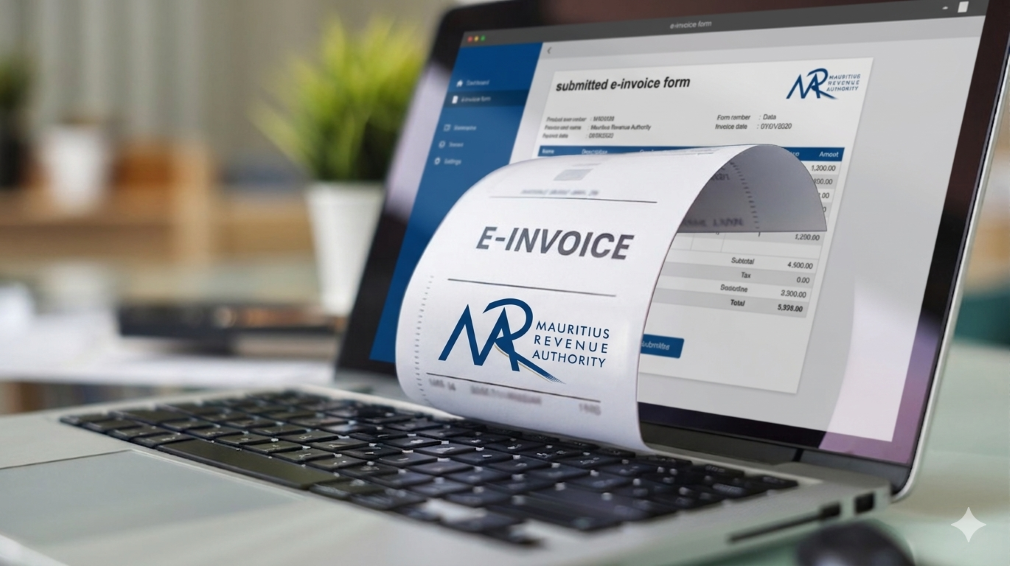
How LithosPOS Supports MRA-Compliant Invoicing for Businesses in Mauritius

In Mauritius, businesses operate within a well-defined regulatory framework that promotes transparency, accuracy, and accountability in financial transactions. The Mauritius Revenue Authority (MRA) plays a central role in shaping this environment by setting clear invoicing and VAT guidelines that businesses must follow.

Rather than viewing compliance as a burden, many businesses today see it as a structured system that supports better financial management. With the help of modern POS software like LithosPOS, aligning with MRA invoicing standards becomes a seamless part of everyday operations.

The Importance of MRA’s Invoicing Framework

The invoicing standards established by MRA are designed to bring consistency and clarity across all business transactions in Mauritius. These guidelines ensure that every invoice contains the necessary fiscal details required for proper tax reporting and verification.

A standard MRA-compliant invoice typically includes:

  • Registered business details
  • VAT registration number
  • Unique and sequential invoice number
  • Date and time of transaction
  • Itemized list of goods or services
  • Applicable VAT rates and amounts
  • Final payable amount

This structured approach helps businesses maintain uniformity in documentation while making tax reporting more accurate and reliable.

Aligning Daily Operations with Compliance

For many businesses, the challenge is not understanding MRA requirements but consistently applying them across every transaction. Manual invoicing or disconnected systems can lead to inconsistencies, missing data, or calculation errors.

LithosPOS addresses this by embedding compliance directly into the billing process. Instead of requiring additional effort, the system ensures that every invoice generated already follows the expected format and structure.

This alignment allows businesses to maintain compliance without disrupting their daily workflow.

How LithosPOS Supports MRA-Compliant Invoicing

LithosPOS is designed to support businesses operating in regulated environments like Mauritius by incorporating essential invoicing standards into its core functionality.

Each invoice generated through LithosPOS is structured to include:

  • Complete business identification details
  • Accurate VAT registration information
  • System-generated sequential invoice numbering
  • Clear item-level breakdowns
  • Correct VAT calculations
  • Transparent totals

By ensuring that these elements are automatically included, LithosPOS reduces the need for manual checks and helps maintain consistency across all transactions.

Accurate VAT Handling Made Simple

VAT accuracy is a key component of MRA compliance. Even small miscalculations can lead to discrepancies in reporting, which may affect tax submissions and financial records.

LithosPOS simplifies VAT management by:

  • Applying predefined VAT rates to products and services
  • Supporting both VAT-inclusive and VAT-exclusive pricing
  • Automatically calculating VAT amounts during billing
  • Generating clear VAT breakdowns on invoices

This ensures that businesses can rely on consistent and accurate tax calculations while maintaining transparency in every transaction.

Automation That Enhances Consistency

One of the key advantages of using POS software like LithosPOS is automation. When invoicing is automated, businesses can eliminate many of the common errors associated with manual processes.

LithosPOS helps maintain consistency by:

  • Standardizing invoice formats across all transactions
  • Ensuring continuous and sequential invoice numbering
  • Reducing dependency on manual data entry
  • Maintaining uniformity across multiple outlets or locations

This level of consistency aligns closely with MRA’s objective of creating a reliable and traceable invoicing system for all businesses.

Supporting Audit Readiness with Organized Data

MRA’s compliance framework also emphasizes the importance of maintaining clear and accessible financial records. During audits or reviews, businesses are expected to provide accurate transaction histories and supporting documents.

LithosPOS supports this requirement by:

  • Storing all transaction data securely
  • Allowing quick retrieval of past invoices
  • Generating detailed sales and VAT reports
  • Maintaining a clear audit trail for every transaction

With organized records readily available, businesses can approach audits with confidence and minimal disruption.

A Structured Approach to Business Growth

Compliance is not just about meeting regulatory requirements; it also contributes to stronger business operations. A well-structured invoicing system improves internal processes, reduces disputes, and builds trust with customers and stakeholders.

By aligning with MRA standards through LithosPOS, businesses can:

  • Improve financial accuracy
  • Maintain consistent documentation
  • Strengthen reporting capabilities
  • Prepare for future regulatory updates

This creates a stable foundation that supports long-term growth and scalability.

Bridging Compliance and Technology

The combination of MRA’s structured guidelines and LithosPOS’s automated capabilities creates a balanced system that makes compliance easier to manage.

Instead of handling compliance as a separate responsibility, businesses can integrate it into their everyday operations. LithosPOS acts as a bridge between regulatory requirements and practical business needs, ensuring that invoicing remains accurate, consistent, and aligned.

Conclusion

MRA’s invoicing standards are designed to create a transparent and reliable business environment in Mauritius. When supported by the right technology, these standards become easier to implement and maintain.

POS software like LithosPOS helps businesses align naturally with MRA requirements by automating invoicing, ensuring VAT accuracy, and maintaining organized records. This approach allows businesses to stay compliant while focusing on operational efficiency and growth.

From retail stores and supermarkets to restaurants, cafés, and service-based businesses, LithosPOS supports consistent and structured invoicing across all business types.

Book a demo today and explore how POS software like LithosPOS can support your business with structured, MRA-aligned invoicing and smarter operations.

Categories
Branding Customer experience Restaurant Restaurant POS Retail Retail POS

POS Software in 2026: The Silent Manager Powering Retail & Restaurants

In 2026, retail and restaurant businesses will no longer be run only by owners, managers, or supervisors. A major part of daily decision-making now happens quietly in the background, powered by POS software. What was once limited to billing has evolved into a silent manager that oversees operations, reduces errors, and keeps businesses running smoothly without constant human intervention.

This shift isn’t about replacing people. It’s about enabling smarter, faster, and more consistent operations in an increasingly complex business environment.

The Evolution of POS Software Beyond Billing

Traditional POS tools focused on one job: completing transactions. But modern POS software in 2026 has expanded far beyond that role. It now monitors inventory movement, tracks sales patterns, highlights inefficiencies, and ensures accuracy across every transaction.

For retail stores and restaurants handling high volumes, multiple staff members, and varied payment methods, this evolution is no longer optional. POS software acts as a central control system, silently coordinating tasks that once required manual supervision.

The Rise of the “Silent Manager”

A silent manager doesn’t give instructions or demand attention. Instead, it works continuously in the background, ensuring operations stay aligned.

In retail and restaurant environments, POS software now:

  • Automatically updates inventory after every sale
  • Ensures price consistency across products and locations
  • Tracks peak hours and sales trends
  • Flags discrepancies without disrupting workflow
  • Maintains accurate records for reporting and compliance

This behind-the-scenes automation reduces the dependency on constant oversight and minimizes the risk of human error.

Why Accuracy Matters More Than Ever in 2026

Customer expectations in 2026 are shaped by speed and reliability. A delayed bill, incorrect price, or missing item can damage trust instantly.

POS software plays a critical role in maintaining accuracy by:

  • Syncing product prices in real time
  • Preventing manual billing mistakes
  • Ensuring stock levels reflect actual availability
  • Reducing mismatches between sales and inventory

For restaurants, this accuracy extends to kitchen orders, table management, and payment reconciliation. For retail stores, it ensures smoother checkouts and better stock planning.

Data That Works Quietly but Powerfully

One of the most underrated aspects of modern POS software is how it handles data. Instead of overwhelming business owners with complex dashboards, POS solutions in 2026 simplify insights.

Sales reports, inventory summaries, and performance metrics are generated automatically and ready when needed. This allows owners to:

  • Identify best-selling items
  • Understand slow-moving stock
  • Plan purchases more efficiently
  • Make informed decisions without guesswork

This form of business intelligence works silently, but its impact is significant.

Offline Reliability Still Matters

Despite advances in connectivity, uninterrupted internet access isn’t guaranteed everywhere. That’s why offline-capable POS software remains highly relevant in 2026.

A reliable POS solution continues to:

  • Process sales without the internet
  • Store transaction data securely
  • Sync automatically once connectivity is restored

This ensures business continuity and protects revenue, especially for stores and restaurants operating in high-traffic or remote locations.

Reducing Operational Stress for Business Owners

Managing a retail store or restaurant often means juggling staff, suppliers, customers, and finances. POS software reduces this burden by handling repetitive operational tasks.

Instead of manually checking stock, reviewing registers, or reconciling sales, business owners can rely on their POS software to maintain order. This shift allows them to focus more on growth, customer experience, and strategy.

POS Software as a Growth Enabler

In 2026, POS software isn’t just a tool; it’s a foundation for scalable growth. Whether managing one store or multiple locations, modern POS solutions support expansion by:

  • Centralizing operations
  • Standardizing processes
  • Providing unified reporting
  • Ensuring consistency across outlets

This silent management layer makes growth more predictable and less chaotic.

The Future Is Quiet, Smart, and Efficient

The most powerful changes in business operations often go unnoticed. POS software in 2026 doesn’t demand attention, yet it plays a crucial role in keeping retail and restaurant businesses efficient, accurate, and resilient.

By quietly managing data, transactions, and workflows, POS software allows businesses to operate with confidence without micromanagement or constant firefighting.

In the years ahead, success won’t depend on working harder, but on working smarter. And for many businesses, that smart work is already happening silently right at the point of sale.

If you want to make your business run smoothly with fewer errors and better control, try POS software like LithosPOS and experience smarter operations every day. Get a free trial today.

Categories
Customer experience Restaurant Restaurant POS Retail Retail POS

Do You Really Know How Your Business Is Performing?

Running a retail store or restaurant is not just about making sales. It is about understanding what is actually happening behind those numbers. Many business owners feel confident when the cash counter looks busy or the store is crowded. But does that really mean your business is performing well?

The truth is, without clear data and meaningful insights, it is easy to miss what is working, what is not, and where money is silently leaking. This is where business analytics and reporting become essential.

Why Feeling Busy Is Not the Same as Performing Well

A common mistake among small and growing businesses is relying on gut feeling. You may feel that sales are increasing, inventory is under control, or staff performance is fine.

But unless you are tracking the right metrics, these assumptions can be misleading.

For example:

  • Are profits growing, or is it just sales volume?
  • Are certain products selling well while others remain unsold?
  • Are peak hours being fully utilised?
  • Are billing errors affecting revenue?

Without proper reporting, these questions remain unanswered.

What Does Business Performance Really Mean?

Business performance goes beyond daily sales totals. It includes:

  • Sales trends across days, weeks, and months
  • Product and category performance
  • Inventory movement and stock ageing
  • Payment method breakdown
  • Staff efficiency and error tracking
  • Peak hours and customer behaviour patterns

Modern businesses rely on POS analytics and reporting to track these insights in real time rather than waiting for end-of-month summaries.

The Problem With Manual Reports and Spreadsheets

Many retailers and restaurant owners still depend on manual registers, spreadsheets, or handwritten end-of-day reports.

While this approach may seem manageable, it often leads to:

  • Delayed and inaccurate data
  • Missed errors
  • Poor visibility into trends
  • Reactive decision-making

Manual reporting also becomes difficult to manage when a business grows or operates across multiple locations.

How POS Analytics Changes the Way You See Your Business

A modern POS solution with built-in analytics allows business owners to move from guesswork to clarity.

With POS reporting tools, you can:

  • View real-time sales reports
  • Identify best-selling and slow-moving products
  • Track inventory levels accurately
  • Understand peak business hours
  • Monitor store performance from a single dashboard

This visibility helps owners take timely action, whether it is restocking fast-moving items, adjusting pricing, or improving staff scheduling.

Real-Time Data Leads to Better Decisions

One of the biggest advantages of POS analytics is real-time reporting. Instead of waiting days or weeks for insights, you can see business performance as it happens.

This helps businesses:

  • Reduce inventory waste
  • Avoid stock shortages
  • Control operational costs
  • Improve cash flow
  • Increase profitability

POS software like LithosPOS is designed to provide clear and actionable insights without overwhelming users with complex data.

Analytics for Retail and Restaurant Businesses

Analytics needs vary slightly across industries, but the goal remains the same: better control and smarter decisions.

For Retail Businesses:

  • Product performance analysis
  • Inventory turnover reports
  • Category-wise sales insights
  • Payment method trends

For Restaurants and Cafes:

  • Peak hour analysis
  • Menu item performance
  • Order volume tracking
  • Staff-wise billing accuracy

POS analytics help businesses understand what drives revenue and where improvements are needed.

Simplifying Multi-Location Performance Tracking

For businesses operating multiple outlets, tracking performance can become challenging. Centralised POS reporting makes this easier by offering:

  • Location-wise sales comparisons
  • Consolidated reports
  • Central inventory visibility
  • Unified performance dashboards

This ensures consistency across outlets and supports confident business expansion.

Why Cloud-Based POS Reporting Matters

Cloud-based POS reporting ensures business data is accessible anytime and from anywhere. It also offers better data security, automatic backups, and real-time updates.

This is especially useful for owners who want visibility into operations without being physically present at the store every day.

Are You Using Data or Just Collecting It?

Many businesses collect data but fail to use it effectively. Real business intelligence comes from understanding trends, asking the right questions, and acting on insights.

A POS solution with smart analytics turns raw data into clear answers, helping owners truly understand how their business is performing.

Final Thoughts

If you are unsure about your sales trends, inventory movement, or operational efficiency, it may be time to rethink how you analyse your business.

POS software like LithosPOS helps retail and restaurant businesses gain clarity through powerful analytics and reporting, without unnecessary complexity. With operations across more than 40 countries, it supports growing businesses with real-time insights and better control.

Want to understand your business performance better?
Try a free trial or book a demo to see how data-driven decisions can transform the way you run your retail/F&B business.

Categories
Branding Customer experience kiosks Retail Retail POS Small businesses

How POS Software Helps Small Retailers Survive Tough Times

Small retailers often feel the pressure first when economic conditions shift. Reduced footfall, rising operational costs, supply chain disruptions, and shrinking profit margins make day-to-day operations more challenging. However, many resilient retailers successfully navigate tough times by relying on smart, data-driven tools. One such tool is POS software, a powerful solution that improves efficiency, reduces waste, and supports better decision-making.

In this blog, we explore how POS software helps small retailers survive tough times, stabilise operations, and stay competitive even during economic downturns.

1. Improving Inventory Accuracy to Reduce Losses

During slow economic periods, every product on the shelf matters. Overstocking ties up capital, while understocking results in missed sales. POS software provides accurate, real-time inventory visibility so retailers can:

  • Track stock levels instantly
  • Reduce dead stock and over-purchasing
  • Forecast demand with historical sales trends
  • Identify best-selling and slow-moving items

Effective inventory management is one of the strongest survival strategies for small retailers, especially when controlling costs becomes a priority.

2. Reducing Human Error with Automation

Manual processes increase the chances of mistakes, misbilling, duplicate entries, incorrect discounts, and stock mismatches. These errors become expensive during tough economic conditions.

POS software minimises risks through automated:

  • Billing
  • Tax calculations
  • Discount application
  • Stock updates
  • Reporting

With fewer mistakes and better accuracy, retailers can safeguard their margins.

3. Faster Checkout to Improve Customer Satisfaction

Slow checkout experiences often drive customers away. During difficult economic periods, shoppers become more selective and prefer businesses that value their time.

A modern retail POS offers:

  • Faster billing speed
  • Multiple payment options
  • QR, card, and wallet acceptance
  • Smooth and error-free checkout

This leads to shorter queues, better customer satisfaction, and higher chances of repeat visits. Even when demand fluctuates, a fast checkout process helps maintain consistent sales.

4. Data-Driven Decisions with Real-Time Business Insights

Tough times require smarter decision-making, not assumptions. POS software gives small retailers actionable insights through:

  • Daily sales reports
  • Category-wise performance
  • Hourly or seasonal trends
  • Customer buying patterns
  • Profit margins and cost reports

When retailers know exactly what is selling, what isn’t, and when customers prefer to shop, they can plan promotions, stock purchases, and staffing more effectively. This data-driven approach protects profitability and reduces unnecessary expenses.

5. Supporting Multi-Channel Selling to Increase Revenue

When foot traffic drops, retailers must diversify their selling channels. Instead of shifting fully to online operations, small retailers can start online sales alongside their offline store.

POS software enables:

  • Unified inventory across online and offline
  • Centralised customer data
  • Easy order management
  • Real-time stock sync
  • Smooth omnichannel operations

By reaching customers across different channels, retailers reduce dependency on walk-ins and maintain steady revenue flow even in downturns.

6. Building Strong Customer Loyalty During Downturns

Customer retention becomes more important when acquiring new customers becomes expensive. POS software plays a big role in strengthening customer loyalty by enabling:

  • Loyalty points
  • Exclusive member offers
  • Digital receipts
  • Customer purchase history
  • Personalized recommendations

When customers feel valued, they are more likely to return even during difficult economic conditions. This ensures stable revenue and long-term relationships.

7. Maintaining Business Continuity with Offline Functionality

Internet disruptions can stop billing and create frustration for both staff and customers. In tough times, retailers cannot afford downtime.

A POS solution with offline functionality ensures:

  • Billing without internet
  • Automatic data sync once online
  • Continuous operations
  • No missed sales

This reliability protects revenue and builds customer trust.

8. Strengthening Long-Term Business Stability

Tough times require adaptability, and POS software gives small retailers the flexibility they need. With better data, faster processes, and reduced operational costs, retailers can:

  • Keep their business steady
  • Retain customers
  • Increase profitability
  • Make smarter decisions
  • Compete with larger retailers

Technology becomes the backbone that helps retail businesses survive and grow even in unpredictable markets.

If you want to use a modern, efficient POS solution…

POS software like LithosPOS supports small retailers with powerful tools for billing, inventory management, payments, customer loyalty, analytics, and multi-channel operations all in one place. It’s designed to help retail businesses stay efficient, accurate, and profitable in any economic condition. 

LithosPOS is trusted by businesses in 50+ countries and continues to help retailers simplify operations and grow steadily.

👉 Try a free trial today
👉 Book a demo to see how it works

Categories
Branding Customer experience kiosks Restaurant Restaurant POS Retail POS Small businesses

How QR Code Ordering Can Transform Table Turnover for Your Restaurant

If you run a busy restaurant, you already know that every minute matters. The faster you take orders, serve food, and clear tables, the more guests you can serve and the more revenue you make.

But here’s the catch: traditional service is slow. Handing menus, taking orders manually, keying them into the POS, bringing bills, this all eats up time.

This is where QR code ordering comes in, and it’s revolutionizing how restaurants handle table turnover.

What Is QR Code Ordering?

QR code ordering lets guests scan a QR code on their table, open a digital menu, place their orders, and even make payments directly from their smartphones. This removes the wait for servers, speeds up communication with the kitchen, and reduces human error.

Why Faster Table Turnover Matters

A restaurant with slow table turnover might serve fewer customers per day, even with a full dining area. Improving turnover means:

  • More guests served without extra seating
  • Shorter wait times for new customers
  • Higher daily revenue
  • Better guest satisfaction

How QR Code Ordering Improves Table Turnover

1. Instant Ordering as Soon as Guests Sit

No more waiting for a server to bring menus. Guests can scan the QR code, explore your digital menu, and send orders instantly to your POS.

  • Orders reach the kitchen faster
  • Customers spend less time deciding
  • Your staff can focus on delivering food

2. Direct Kitchen Communication for Faster Prep

QR orders are sent straight to the kitchen display system (KDS) or POS. This eliminates delays caused by manual order-taking or miscommunication.
✅ Faster prep time
✅ Reduced errors
✅ Smoother service flow

3. Shorter Checkout Process

Waiting for the bill often adds 10–15 minutes to table time. QR code ordering with contactless payment options like UPI, cards, or wallets allows guests to pay instantly and leave when they’re ready.

4. Boosts Staff Productivity

Your servers don’t have to spend time taking orders or printing bills. Instead, they can focus on:

  • Greeting new guests
  • Delivering food and drinks
  • Clearing tables faster

This increases efficiency while still providing excellent hospitality.

5. Encourages Upselling Without Slowing Service

Digital menus can feature:

  • Add-on suggestions (extra toppings, sides, drinks)
  • Mouth-watering food images
  • Highlighted specials

This increases the average order value without requiring guests to wait for server recommendations.

The Bottom Line

QR code ordering isn’t just a convenience feature; it’s a growth tool for restaurants. Cutting order wait times, speeding payments, and improving accuracy helps you:

✅ Serve more guests per shift
✅ Boost revenue without adding more seats
✅ Deliver a smoother, faster dining experience

If you’re ready to upgrade your operations, consider a POS solution that integrates QR ordering, payments, and kitchen display systems. This all-in-one approach ensures you’re not just keeping up with trends, you’re staying ahead of them.

Suppose you want to increase efficiency in your restaurant or retail business. In that case, LithosPOS is the best solution. Contact us today to get started and take your operations to the next level.