Categories
Restaurant POS Retail POS

How to Compare POS Systems Before Buying: The Complete Evaluation Guide

Not all POS systems are built the same, and the wrong choice can cost you thousands.

This guide covers every criterion you need to evaluate before committing to a point-of-sale system, from real-time inventory and payment processing to hidden fees, hardware lock-in, and multi-location scalability.

In this guide

  1. What is a POS system, and why does your choice matter?
  2. Cloud POS vs on-premise POS: which is right for you?
  3. The 8 must-evaluate criteria before buying
  4. Quick comparison table: what to look for by business type
  5. Red flags to watch out for
  6. Your pre-purchase evaluation checklist
  7. Frequently asked questions

What is a POS system, and why does your choice matter?

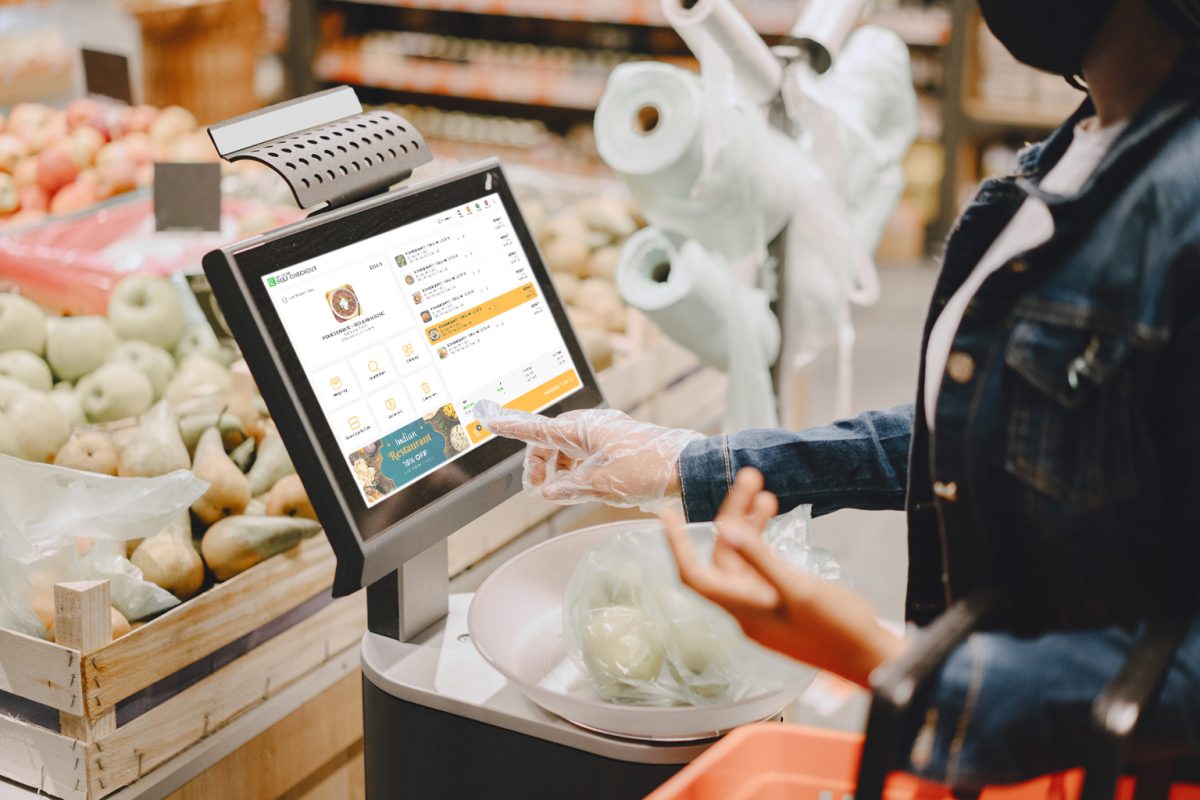
point-of-sale (POS) system is the central hub of your business operations. It processes transactions, tracks inventory, manages staff, generates reports, and connects your physical store to your online presence. In 2026, the best POS systems go far beyond just ringing up a sale.

The wrong POS system can lock you into high payment processing fees, limit your ability to scale, and cause operational chaos during peak hours. The right one pays for itself through better inventory control, faster checkout, and smarter business decisions. According to Statista, the global POS software market is projected to surpass $29 billion by 2028, reflecting how central these systems have become to modern retail and hospitality.

Cloud POS vs on-premise POS: which is right for you?

Before you compare specific systems, you need to decide on the architecture that fits your business. The two main types are cloud-based and on-premise POS. Each has real tradeoffs depending on your location, budget, and operational needs. Forbes Advisor consistently highlights cloud POS as the preferred choice for growing businesses due to its flexibility and lower upfront cost.

  • Cloud-based POS – Hosted online. Access anywhere. Auto-updates. Lower upfront cost. Ideal for multi-location businesses and remote monitoring.
  • On-premise POS – Installed locally. Higher upfront investment. Works offline without internet dependency. Better for high-security data environments.

Quick rule: If you have multiple locations or want to monitor sales remotely, cloud POS wins every time. LithosPOS is fully cloud-based and operates across 40+ countries with real-time sync. If you are in an area with unreliable internet, look for a system with a reliable offline mode.

The 8 must-evaluate criteria before buying any POS system

1. Real-time inventory management

Your POS must sync stock levels instantly across all locations, with sub-10-second updates during high-volume periods. Look for automated reorder triggers, SKU variant support, and multi-location dashboards. A system that only syncs periodically will cause overselling and stockouts. LithosPOS restaurant POS and retail POS both include real-time inventory tracking built into the core platform.

Ask vendors: Does your inventory update in real time across all registers and locations simultaneously, including during offline mode?

2. Payment processing flexibility

Some POS systems lock you into their own payment processor. On $50,000/month in card sales, this can cost you an extra $3,200 to $5,000 per year compared to choosing your own interchange-plus processor. Always ask whether you can bring your own merchant services provider. The PCI Security Standards Council recommends verifying your processor is fully PCI-DSS compliant before committing.

3. Hardware compatibility and cost

Avoid non-cancellable hardware leases. A $500 terminal on a 48-month lease can cost over $2,300 total. Look for systems that support industry-standard hardware (iPad, Android tablets, Sunmi/PAX terminals) or can reprogram your existing devices. Always buy hardware outright when possible. Check the LithosPOS pricing page to understand what hardware options are available with each plan.

4. Industry-specific features

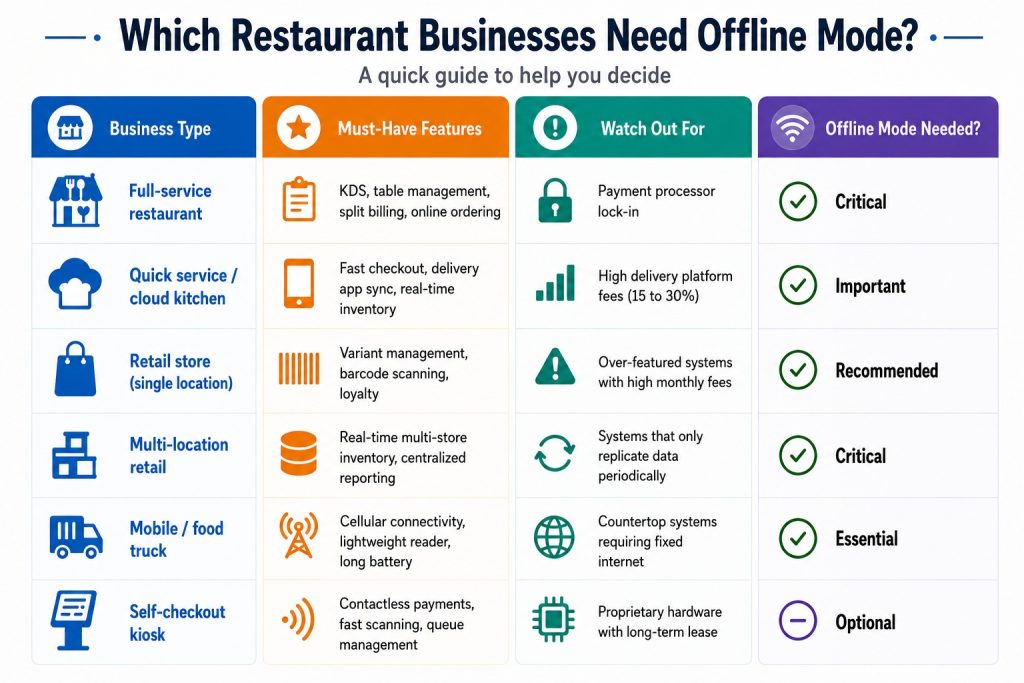
Restaurant POS systems need table management, kitchen display systems (KDS), split billing, and online ordering. Retail POS systems need variant management (size/color/SKU), e-commerce sync, and loyalty programs. Never use a retail POS for a high-volume restaurant as the workflows are completely different and you will end up building costly workarounds.

5. Offline mode reliability

Even in 2026, internet outages happen. A reliable POS must queue transactions locally to a durable, journaled store that survives device restarts, not just in-memory. Verify that the system can process transactions for at least 4 to 8 hours offline and reconcile automatically when reconnected. Investopedia notes that offline capability is one of the most overlooked criteria during the POS evaluation process.

6. Reporting and AI-driven analytics

Modern POS systems now offer predictive inventory suggestions, staff performance analytics, and demand forecasting. Look for systems that tell you what you are going to sell, not just what you sold. This is now the fastest-growing area in retail and restaurant tech, with Gartner identifying AI-powered analytics as a top priority for operations leaders in 2026.

7. Third-party software compatibility

Your POS should not be an island. It must connect to your accounting software (QuickBooksXero), payroll tools, CRM, marketing platforms, and e-commerce stores. Verify every connection is native before signing any contract. LithosPOS supports a wide range of third-party tools out of the box.

8. Total cost of ownership (not just the monthly fee)

Beyond the software subscription, calculate menu/inventory upload fees, PCI compliance charges, hardware shipping, payment processing rates, and support tier costs. A system with a higher monthly fee but lower transaction rates often saves more money at scale. Review the LithosPOS pricing page for a transparent breakdown with no hidden fees.

Hidden costs to ask about: Setup fees, data migration charges, per-location pricing, transaction minimums, and contract cancellation penalties.

Quick comparison: what to prioritize by business type
Red flags to watch out for when comparing POS vendors

🛑 Unannounced in-person sales visits with “today only” pricing pressure

🛑 Rate quotes below 1.0% flat, as hidden fees almost always apply

🛑 Non-cancellable equipment leases (48-month leases are the worst deal in the industry)

🛑 No references from businesses in your industry with similar volume

🛑 Inventory that syncs “periodically” instead of in real time

🛑 Support teams are in the wrong time zone for your operating hours

Your pre-purchase POS evaluation checklist

✅ Define your must-have features before booking any demo

✅ Request a full cost breakdown: software, hardware, processing, and support

✅ Ask for a live demo of offline mode, not a slide deck explanation

✅ Test inventory sync speed across locations during a demo transaction

✅ Verify all promised connections are native, not middleware-dependent

✅ Ask for references from similar-sized businesses in your vertical

✅ Review the contract cancellation terms before signing anything

✅ Calculate your effective processing rate at your actual monthly volume

✅ Confirm data migration support is included, not a paid add-on

✅ Check PCI compliance tools are included in the plan, not separately billed

Ready to run through this checklist with a real system? Book a LithosPOS demo and we will walk you through every criterion live.

Frequently asked questions

1. What is the most important factor when choosing a POS system? Payment processing cost. Your POS is permanently tied to a payment processor that takes a cut of every single sale. A system with great features but locked-in high processing rates will cost you far more over time than a simpler system with flexible, competitive pricing. Before anything else, calculate your effective processing rate at your actual monthly card volume and compare it across vendors.

2. What is the difference between cloud POS and traditional POS? A cloud POS stores your data online and lets you access it from any device, anywhere. It updates automatically, has a lower upfront cost, and is ideal for businesses with multiple locations or remote monitoring needs. A traditional (on-premise) POS stores data locally on your own server, giving you full control and offline reliability but requiring a higher setup investment and in-house IT maintenance. For most modern businesses, cloud POS is the smarter long-term choice.

3. How much does a POS system cost per month? It depends on what your business needs. Basic POS software starts free for entry-level plans and scales to $40 to $400 per month for systems with inventory management, multi-location support, and advanced reporting. On top of that, factor in payment processing fees (typically 2.5 to 2.9% per transaction) and hardware costs. Always calculate the total cost of ownership, not just the software subscription fee.

4. Can a POS system work without internet? Yes, but not all systems handle it equally well. A reliable POS must queue transactions locally to a durable store that survives device restarts and auto-reconcile everything when the internet returns. Some systems marketed as offline capable only hold data in memory, meaning a reboot during an outage wipes your transaction queue. Always test offline mode live during your demo before committing.

5. What POS system is best for restaurants vs retail? They need completely different feature sets. A restaurant POS needs table management, kitchen display systems (KDS), split billing, course-by-course ordering, and delivery app sync. A retail POS needs SKU and variant management (size, color, style), barcode scanning, multi-location inventory, and e-commerce channel sync. Never use a generic or cross-purpose system for either as the workflow mismatch will create costly operational workarounds.

6. How do I avoid hidden fees when buying a POS system? Always ask for a full cost breakdown beyond the advertised software fee. Key things to ask about: menu or inventory upload fees, PCI compliance charges, hardware shipping costs, data migration fees, per-location pricing, and contract cancellation penalties. Then calculate your effective processing rate at your real monthly card volume, not the base rate shown in marketing materials. A legitimate vendor will give you all of this upfront without pressure.
Categories
Restaurant POS Retail POS

Loyverse vs Fudo vs LithosPOS: Which is the Best POS software for your Business in 2026?

Choosing the wrong Point of Sale (POS) software can cost you thousands of dollars in lost inventory, compliance fines, and customers frustrated by slow checkout lines. If you’re reading this, you are likely looking for an alternative to Loyverse, evaluating Fudo, or dealing with outdated, clunky legacy systems.

In 2026, a POS software is no longer just a “cash register.” It is the financial engine of your business. It must handle multiple locations effortlessly, continue processing sales even without the internet, and integrate seamlessly with your accounting and e-commerce platforms.

In this definitive guide, we compare Loyverse, Fudo, and LithosPOS to help you make the right choice for your retail store or restaurant.

The Hidden Cost of “Free” POS software

Many business owners start with freemium applications like Loyverse. It’s free to start and easy to download on an iPad. However, as your business grows and you open a second or third location, you hit a glass ceiling:

  • The Integration Nightmare: Global freemium solutions rarely offer deep, native integrations with local accounting systems or electronic invoicing mandates. You end up paying for expensive third-party connectors like Zapier or entering data manually.
  • Non-Existent VIP Support: When your system crashes on a busy Friday night, you cannot rely on a community forum or an email ticket that takes 48 hours to resolve. You need immediate human help.
  • Lack of True “Offline Mode”: If the internet drops, your business stops. Basic systems won’t let you print kitchen tickets or close secure payments offline. A true offline POS is essential.

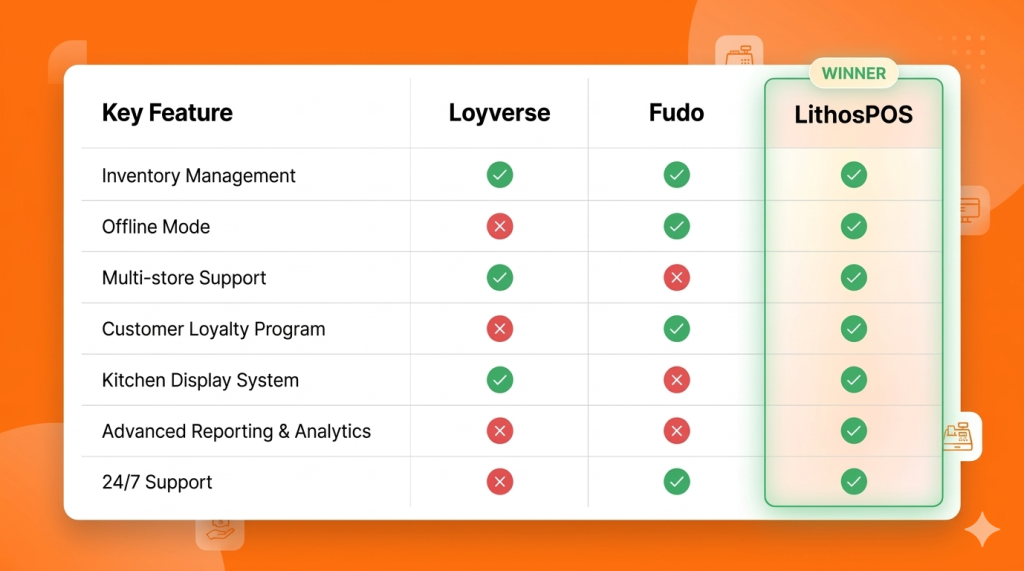
POS software Comparison Matrix (2026)

This table summarizes the key differences between the top POS alternatives.

Deep Dive: Which software should you choose?

1. Loyverse: Best for Hobbyists and Pop-ups

The Verdict: Loyverse is an excellent global freemium POS for one-person businesses, mobile coffee carts, or temporary pop-up shops. However, it lacks vital B2B features like advanced matrix inventory and real-time enterprise support.

  • The Best Part: It is free to start, and the interface is very user-friendly.
  • The Catch: “Free” becomes expensive when you need real accounting integrations, warehouse management for 3+ locations, or emergency phone support.

2. Fudo: Strong in Restaurants, Weak in Multi-Store Retail

The Verdict: Fudo is a specialized management software for gastronomy. It is a solid choice if you only operate a single, small restaurant.

  • The Best Part: The interface is designed specifically for restaurant workflows (tables, waiters, kitchen routing).
  • The Catch: If your business is mixed (e.g., a bakery that also sells packaged retail goods), Fudo falls short in matrix inventory management and warehouse transfers. It is not built to scale complex retail operations.

3. LithosPOS: The Growth Engine for Scaling Businesses

The Verdict: LithosPOS is the ultimate comprehensive POS system for scaling businesses in 2026. It combines a modern, sleek cloud interface with a powerful multi-store engine and a true “Offline Mode.”

  • Unbreakable Offline Mode: Unlike the competition, if your internet provider fails, LithosPOS keeps billing, printing kitchen tickets, and securely storing data to sync automatically when the connection returns. You never lose a sale. Learn more about our offline POS capabilities.
  • Total Multi-Store Control: Whether you have 2 or 50 locations, LithosPOS lets you view real-time inventory across all stores, execute stock transfers, and analyze centralized reports right from your phone using the Smart Dashboard app.
  • Limitless Integrations: With over 50+ payment gateways, accounting integrations (QuickBooks, SAP, OracleERP), and e-commerce syncing, LithosPOS fits perfectly into your existing tech stack.
  • Support That Understands Your Business: When your POS is the heart of your operation, you need experts available 24/7, not a help forum.

Conclusion:

When is it time to migrate to LithosPOS?

If your business is losing sales due to slow software, you are bleeding money from inventory shrinkage (“employee theft”) due to poor stock tracking, or you are stressed about accounting and invoicing compliance… it is time to leave free apps and legacy software behind.

LithosPOS is built for small business owners who demand frictionless growth, total inventory control, and operational peace of mind.

Ready to scale your business in 2026? Don’t just take our word for it. Speak with one of our implementation experts and discover exactly how LithosPOS can automate your operations today.

Book a Free Demo and Talk to an Advisor Today

Categories
Customer experience Restaurant Restaurant POS

5 Costly Mistakes Cloud Kitchens Make Without the Right POS Software

The cloud kitchen industry has grown rapidly over the past few years. With lower setup costs and the rising demand for online food delivery, many entrepreneurs are launching delivery-only restaurants. However, running a successful cloud kitchen requires more than just great food and delivery partners. Behind every efficient operation is strong technology, especially a reliable POS software.

Without the right POS solution, cloud kitchens often face operational challenges that can slow down growth, create confusion, and impact customer satisfaction. Many businesses underestimate the importance of a smart POS platform until problems begin to appear.

Here are five costly mistakes cloud kitchens make when they operate without the right POS software like LithosPOS.

1. Struggling to Manage High Order Volumes

Cloud kitchens often receive orders from multiple online channels at the same time. During peak hours, managing these orders manually or through disconnected systems can quickly become overwhelming.

Without a proper POS platform, staff may need to switch between different dashboards or devices to track incoming orders. This increases the chances of missed orders, delays, and confusion in the kitchen.

A modern POS solution centralizes all orders in one place, allowing kitchen teams to manage incoming requests smoothly. This improves workflow, reduces stress during rush hours, and ensures every order is processed correctly.

2. Frequent Order Errors and Customer Complaints

Accuracy is critical in the food delivery business. If customers receive the wrong item or a missing order component, it can lead to negative reviews and loss of trust.

Cloud kitchens that rely on manual order handling are more likely to experience errors. Staff may misread orders, forget modifications, or enter incorrect details.

POS software helps eliminate these issues by displaying orders clearly and sending them directly to the kitchen workflow. Some solutions also integrate with kitchen display systems, ensuring chefs see exactly what needs to be prepared.

This structured approach helps reduce mistakes and improve overall order accuracy, leading to better customer experiences.

3. Poor Inventory Management

Inventory management is one of the most overlooked areas in cloud kitchen operations. When stock levels are not tracked properly, businesses may run out of ingredients unexpectedly or overstock items that expire quickly.

Without a POS platform tracking ingredient usage and sales patterns, managers often rely on guesswork when planning purchases.

Smart POS solutions automatically track product sales and update inventory levels in real time. This helps cloud kitchens maintain the right balance of stock, reduce food wastage, and make informed purchasing decisions.

Better inventory visibility also ensures that menu items remain available for customers, preventing lost sales.

4. Lack of Data for Business Decisions

Many cloud kitchens operate without clear insights into their performance. Owners may know how many orders they receive daily, but they often lack deeper data about sales trends, popular menu items, or peak ordering times.

Without analytics, it becomes difficult to make strategic decisions that drive growth.

POS software collects and organizes business data automatically. It allows operators to track metrics such as top-selling items, revenue patterns, and order trends.

These insights help cloud kitchen owners adjust menus, optimize pricing strategies, and plan marketing campaigns based on real data rather than assumptions.

In a competitive market, data-driven decisions can make a major difference.

5. Difficulty Scaling the Business

One of the biggest advantages of the cloud kitchen model is scalability. Many businesses start with one brand and later expand to multiple virtual brands or additional locations.

However, scaling operations becomes difficult when the technology infrastructure is not built for growth.

Without the right POS platform, managing multiple brands, menus, or locations can become complicated. Business owners may struggle to monitor performance across different operations or maintain consistency.

A modern POS solution provides centralized control over multiple brands and outlets. It allows operators to manage menus, track sales, and monitor operations from a single dashboard.

This flexibility makes expansion smoother and helps cloud kitchens grow without losing operational control.

Why the Right POS Software Matters for Cloud Kitchens

Cloud kitchens rely heavily on speed, accuracy, and efficiency. Unlike traditional restaurants, they operate in a digital-first environment where every order flows through online platforms.

A powerful POS solution acts as the backbone of the entire operation. It connects orders, inventory, kitchen workflows, and sales data into one organized system.

By adopting a POS software like LithosPOS, cloud kitchen operators can simplify daily operations, reduce errors, improve order management, and make better business decisions.

Final Thoughts

The success of a cloud kitchen depends not only on food quality but also on how efficiently operations are managed. Businesses that rely on outdated systems or manual processes often face operational bottlenecks that slow their growth.

Avoiding these common mistakes starts with investing in the right technology.

With a reliable POS platform in place, cloud kitchens can streamline operations, enhance customer satisfaction, and scale confidently in an increasingly competitive food delivery market.

As the cloud kitchen industry continues to evolve, technology will remain the key factor separating struggling operations from highly successful ones.

Categories
Customer experience Restaurant Restaurant POS Retail Retail POS

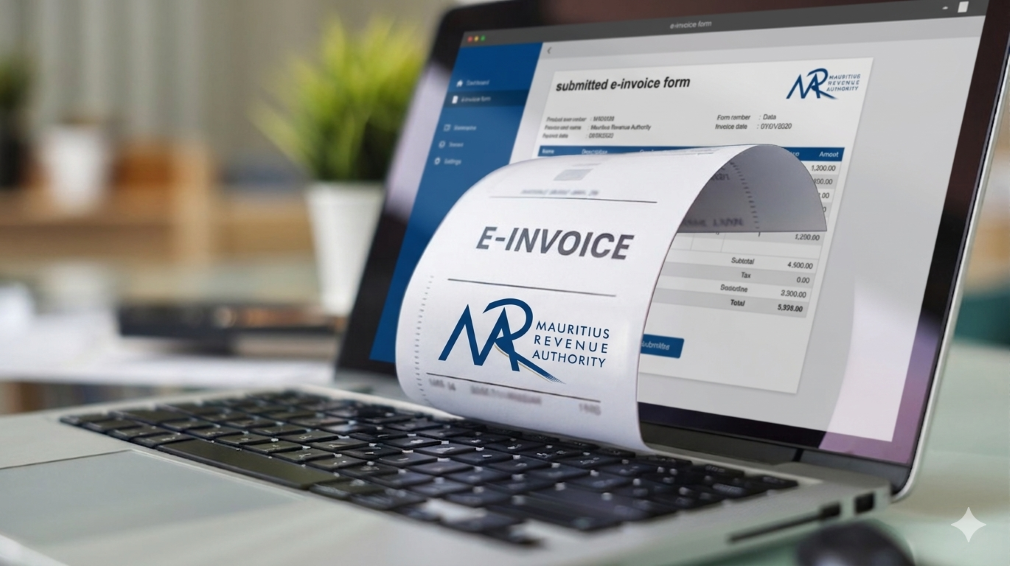
How LithosPOS Supports MRA-Compliant Invoicing for Businesses in Mauritius

In Mauritius, businesses operate within a well-defined regulatory framework that promotes transparency, accuracy, and accountability in financial transactions. The Mauritius Revenue Authority (MRA) plays a central role in shaping this environment by setting clear invoicing and VAT guidelines that businesses must follow.

Rather than viewing compliance as a burden, many businesses today see it as a structured system that supports better financial management. With the help of modern POS software like LithosPOS, aligning with MRA invoicing standards becomes a seamless part of everyday operations.

The Importance of MRA’s Invoicing Framework

The invoicing standards established by MRA are designed to bring consistency and clarity across all business transactions in Mauritius. These guidelines ensure that every invoice contains the necessary fiscal details required for proper tax reporting and verification.

A standard MRA-compliant invoice typically includes:

  • Registered business details
  • VAT registration number
  • Unique and sequential invoice number
  • Date and time of transaction
  • Itemized list of goods or services
  • Applicable VAT rates and amounts
  • Final payable amount

This structured approach helps businesses maintain uniformity in documentation while making tax reporting more accurate and reliable.

Aligning Daily Operations with Compliance

For many businesses, the challenge is not understanding MRA requirements but consistently applying them across every transaction. Manual invoicing or disconnected systems can lead to inconsistencies, missing data, or calculation errors.

LithosPOS addresses this by embedding compliance directly into the billing process. Instead of requiring additional effort, the system ensures that every invoice generated already follows the expected format and structure.

This alignment allows businesses to maintain compliance without disrupting their daily workflow.

How LithosPOS Supports MRA-Compliant Invoicing

LithosPOS is designed to support businesses operating in regulated environments like Mauritius by incorporating essential invoicing standards into its core functionality.

Each invoice generated through LithosPOS is structured to include:

  • Complete business identification details
  • Accurate VAT registration information
  • System-generated sequential invoice numbering
  • Clear item-level breakdowns
  • Correct VAT calculations
  • Transparent totals

By ensuring that these elements are automatically included, LithosPOS reduces the need for manual checks and helps maintain consistency across all transactions.

Accurate VAT Handling Made Simple

VAT accuracy is a key component of MRA compliance. Even small miscalculations can lead to discrepancies in reporting, which may affect tax submissions and financial records.

LithosPOS simplifies VAT management by:

  • Applying predefined VAT rates to products and services
  • Supporting both VAT-inclusive and VAT-exclusive pricing
  • Automatically calculating VAT amounts during billing
  • Generating clear VAT breakdowns on invoices

This ensures that businesses can rely on consistent and accurate tax calculations while maintaining transparency in every transaction.

Automation That Enhances Consistency

One of the key advantages of using POS software like LithosPOS is automation. When invoicing is automated, businesses can eliminate many of the common errors associated with manual processes.

LithosPOS helps maintain consistency by:

  • Standardizing invoice formats across all transactions
  • Ensuring continuous and sequential invoice numbering
  • Reducing dependency on manual data entry
  • Maintaining uniformity across multiple outlets or locations

This level of consistency aligns closely with MRA’s objective of creating a reliable and traceable invoicing system for all businesses.

Supporting Audit Readiness with Organized Data

MRA’s compliance framework also emphasizes the importance of maintaining clear and accessible financial records. During audits or reviews, businesses are expected to provide accurate transaction histories and supporting documents.

LithosPOS supports this requirement by:

  • Storing all transaction data securely
  • Allowing quick retrieval of past invoices
  • Generating detailed sales and VAT reports
  • Maintaining a clear audit trail for every transaction

With organized records readily available, businesses can approach audits with confidence and minimal disruption.

A Structured Approach to Business Growth

Compliance is not just about meeting regulatory requirements; it also contributes to stronger business operations. A well-structured invoicing system improves internal processes, reduces disputes, and builds trust with customers and stakeholders.

By aligning with MRA standards through LithosPOS, businesses can:

  • Improve financial accuracy
  • Maintain consistent documentation
  • Strengthen reporting capabilities
  • Prepare for future regulatory updates

This creates a stable foundation that supports long-term growth and scalability.

Bridging Compliance and Technology

The combination of MRA’s structured guidelines and LithosPOS’s automated capabilities creates a balanced system that makes compliance easier to manage.

Instead of handling compliance as a separate responsibility, businesses can integrate it into their everyday operations. LithosPOS acts as a bridge between regulatory requirements and practical business needs, ensuring that invoicing remains accurate, consistent, and aligned.

Conclusion

MRA’s invoicing standards are designed to create a transparent and reliable business environment in Mauritius. When supported by the right technology, these standards become easier to implement and maintain.

POS software like LithosPOS helps businesses align naturally with MRA requirements by automating invoicing, ensuring VAT accuracy, and maintaining organized records. This approach allows businesses to stay compliant while focusing on operational efficiency and growth.

From retail stores and supermarkets to restaurants, cafés, and service-based businesses, LithosPOS supports consistent and structured invoicing across all business types.

Book a demo today and explore how POS software like LithosPOS can support your business with structured, MRA-aligned invoicing and smarter operations.

Categories
Branding Customer experience Restaurant Restaurant POS Retail Retail POS

POS Software in 2026: The Silent Manager Powering Retail & Restaurants

In 2026, retail and restaurant businesses will no longer be run only by owners, managers, or supervisors. A major part of daily decision-making now happens quietly in the background, powered by POS software. What was once limited to billing has evolved into a silent manager that oversees operations, reduces errors, and keeps businesses running smoothly without constant human intervention.

This shift isn’t about replacing people. It’s about enabling smarter, faster, and more consistent operations in an increasingly complex business environment.

The Evolution of POS Software Beyond Billing

Traditional POS tools focused on one job: completing transactions. But modern POS software in 2026 has expanded far beyond that role. It now monitors inventory movement, tracks sales patterns, highlights inefficiencies, and ensures accuracy across every transaction.

For retail stores and restaurants handling high volumes, multiple staff members, and varied payment methods, this evolution is no longer optional. POS software acts as a central control system, silently coordinating tasks that once required manual supervision.

The Rise of the “Silent Manager”

A silent manager doesn’t give instructions or demand attention. Instead, it works continuously in the background, ensuring operations stay aligned.

In retail and restaurant environments, POS software now:

  • Automatically updates inventory after every sale
  • Ensures price consistency across products and locations
  • Tracks peak hours and sales trends
  • Flags discrepancies without disrupting workflow
  • Maintains accurate records for reporting and compliance

This behind-the-scenes automation reduces the dependency on constant oversight and minimizes the risk of human error.

Why Accuracy Matters More Than Ever in 2026

Customer expectations in 2026 are shaped by speed and reliability. A delayed bill, incorrect price, or missing item can damage trust instantly.

POS software plays a critical role in maintaining accuracy by:

  • Syncing product prices in real time
  • Preventing manual billing mistakes
  • Ensuring stock levels reflect actual availability
  • Reducing mismatches between sales and inventory

For restaurants, this accuracy extends to kitchen orders, table management, and payment reconciliation. For retail stores, it ensures smoother checkouts and better stock planning.

Data That Works Quietly but Powerfully

One of the most underrated aspects of modern POS software is how it handles data. Instead of overwhelming business owners with complex dashboards, POS solutions in 2026 simplify insights.

Sales reports, inventory summaries, and performance metrics are generated automatically and ready when needed. This allows owners to:

  • Identify best-selling items
  • Understand slow-moving stock
  • Plan purchases more efficiently
  • Make informed decisions without guesswork

This form of business intelligence works silently, but its impact is significant.

Offline Reliability Still Matters

Despite advances in connectivity, uninterrupted internet access isn’t guaranteed everywhere. That’s why offline-capable POS software remains highly relevant in 2026.

A reliable POS solution continues to:

  • Process sales without the internet
  • Store transaction data securely
  • Sync automatically once connectivity is restored

This ensures business continuity and protects revenue, especially for stores and restaurants operating in high-traffic or remote locations.

Reducing Operational Stress for Business Owners

Managing a retail store or restaurant often means juggling staff, suppliers, customers, and finances. POS software reduces this burden by handling repetitive operational tasks.

Instead of manually checking stock, reviewing registers, or reconciling sales, business owners can rely on their POS software to maintain order. This shift allows them to focus more on growth, customer experience, and strategy.

POS Software as a Growth Enabler

In 2026, POS software isn’t just a tool; it’s a foundation for scalable growth. Whether managing one store or multiple locations, modern POS solutions support expansion by:

  • Centralizing operations
  • Standardizing processes
  • Providing unified reporting
  • Ensuring consistency across outlets

This silent management layer makes growth more predictable and less chaotic.

The Future Is Quiet, Smart, and Efficient

The most powerful changes in business operations often go unnoticed. POS software in 2026 doesn’t demand attention, yet it plays a crucial role in keeping retail and restaurant businesses efficient, accurate, and resilient.

By quietly managing data, transactions, and workflows, POS software allows businesses to operate with confidence without micromanagement or constant firefighting.

In the years ahead, success won’t depend on working harder, but on working smarter. And for many businesses, that smart work is already happening silently right at the point of sale.

If you want to make your business run smoothly with fewer errors and better control, try POS software like LithosPOS and experience smarter operations every day. Get a free trial today.

Categories
Customer experience Restaurant Restaurant POS Retail Retail POS

Do You Really Know How Your Business Is Performing?

Running a retail store or restaurant is not just about making sales. It is about understanding what is actually happening behind those numbers. Many business owners feel confident when the cash counter looks busy or the store is crowded. But does that really mean your business is performing well?

The truth is, without clear data and meaningful insights, it is easy to miss what is working, what is not, and where money is silently leaking. This is where business analytics and reporting become essential.

Why Feeling Busy Is Not the Same as Performing Well

A common mistake among small and growing businesses is relying on gut feeling. You may feel that sales are increasing, inventory is under control, or staff performance is fine.

But unless you are tracking the right metrics, these assumptions can be misleading.

For example:

  • Are profits growing, or is it just sales volume?
  • Are certain products selling well while others remain unsold?
  • Are peak hours being fully utilised?
  • Are billing errors affecting revenue?

Without proper reporting, these questions remain unanswered.

What Does Business Performance Really Mean?

Business performance goes beyond daily sales totals. It includes:

  • Sales trends across days, weeks, and months
  • Product and category performance
  • Inventory movement and stock ageing
  • Payment method breakdown
  • Staff efficiency and error tracking
  • Peak hours and customer behaviour patterns

Modern businesses rely on POS analytics and reporting to track these insights in real time rather than waiting for end-of-month summaries.

The Problem With Manual Reports and Spreadsheets

Many retailers and restaurant owners still depend on manual registers, spreadsheets, or handwritten end-of-day reports.

While this approach may seem manageable, it often leads to:

  • Delayed and inaccurate data
  • Missed errors
  • Poor visibility into trends
  • Reactive decision-making

Manual reporting also becomes difficult to manage when a business grows or operates across multiple locations.

How POS Analytics Changes the Way You See Your Business

A modern POS solution with built-in analytics allows business owners to move from guesswork to clarity.

With POS reporting tools, you can:

  • View real-time sales reports
  • Identify best-selling and slow-moving products
  • Track inventory levels accurately
  • Understand peak business hours
  • Monitor store performance from a single dashboard

This visibility helps owners take timely action, whether it is restocking fast-moving items, adjusting pricing, or improving staff scheduling.

Real-Time Data Leads to Better Decisions

One of the biggest advantages of POS analytics is real-time reporting. Instead of waiting days or weeks for insights, you can see business performance as it happens.

This helps businesses:

  • Reduce inventory waste
  • Avoid stock shortages
  • Control operational costs
  • Improve cash flow
  • Increase profitability

POS software like LithosPOS is designed to provide clear and actionable insights without overwhelming users with complex data.

Analytics for Retail and Restaurant Businesses

Analytics needs vary slightly across industries, but the goal remains the same: better control and smarter decisions.

For Retail Businesses:

  • Product performance analysis
  • Inventory turnover reports
  • Category-wise sales insights
  • Payment method trends

For Restaurants and Cafes:

  • Peak hour analysis
  • Menu item performance
  • Order volume tracking
  • Staff-wise billing accuracy

POS analytics help businesses understand what drives revenue and where improvements are needed.

Simplifying Multi-Location Performance Tracking

For businesses operating multiple outlets, tracking performance can become challenging. Centralised POS reporting makes this easier by offering:

  • Location-wise sales comparisons
  • Consolidated reports
  • Central inventory visibility
  • Unified performance dashboards

This ensures consistency across outlets and supports confident business expansion.

Why Cloud-Based POS Reporting Matters

Cloud-based POS reporting ensures business data is accessible anytime and from anywhere. It also offers better data security, automatic backups, and real-time updates.

This is especially useful for owners who want visibility into operations without being physically present at the store every day.

Are You Using Data or Just Collecting It?

Many businesses collect data but fail to use it effectively. Real business intelligence comes from understanding trends, asking the right questions, and acting on insights.

A POS solution with smart analytics turns raw data into clear answers, helping owners truly understand how their business is performing.

Final Thoughts

If you are unsure about your sales trends, inventory movement, or operational efficiency, it may be time to rethink how you analyse your business.

POS software like LithosPOS helps retail and restaurant businesses gain clarity through powerful analytics and reporting, without unnecessary complexity. With operations across more than 40 countries, it supports growing businesses with real-time insights and better control.

Want to understand your business performance better?
Try a free trial or book a demo to see how data-driven decisions can transform the way you run your retail/F&B business.

Categories
Branding Customer experience kiosks Restaurant Restaurant POS Retail POS Small businesses

How QR Code Ordering Can Transform Table Turnover for Your Restaurant

If you run a busy restaurant, you already know that every minute matters. The faster you take orders, serve food, and clear tables, the more guests you can serve and the more revenue you make.

But here’s the catch: traditional service is slow. Handing menus, taking orders manually, keying them into the POS, bringing bills, this all eats up time.

This is where QR code ordering comes in, and it’s revolutionizing how restaurants handle table turnover.

What Is QR Code Ordering?

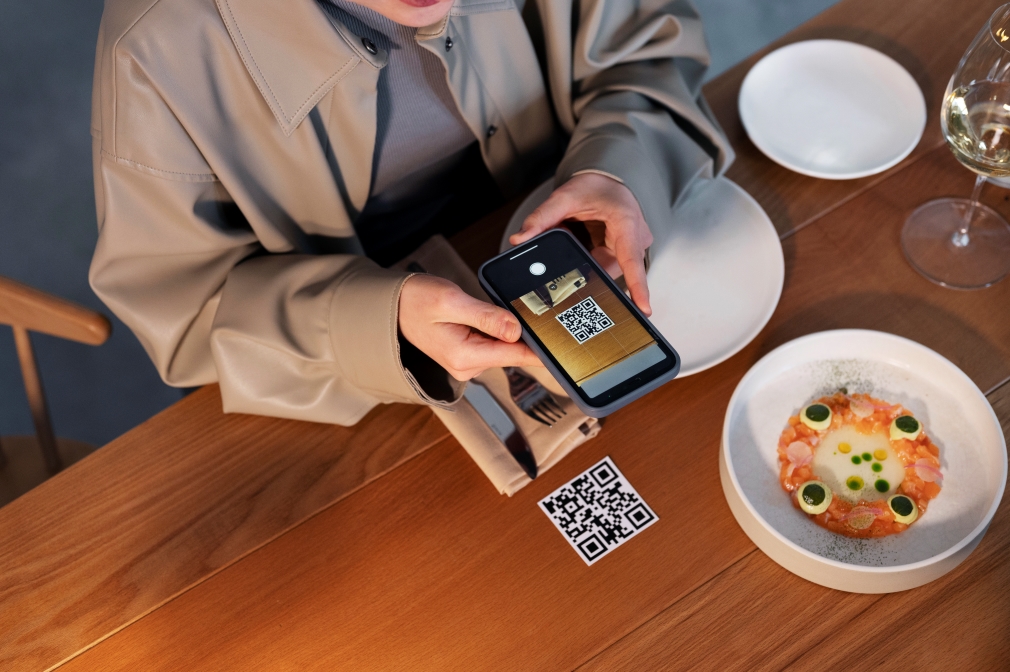
QR code ordering lets guests scan a QR code on their table, open a digital menu, place their orders, and even make payments directly from their smartphones. This removes the wait for servers, speeds up communication with the kitchen, and reduces human error.

Why Faster Table Turnover Matters

A restaurant with slow table turnover might serve fewer customers per day, even with a full dining area. Improving turnover means:

  • More guests served without extra seating
  • Shorter wait times for new customers
  • Higher daily revenue
  • Better guest satisfaction

How QR Code Ordering Improves Table Turnover

1. Instant Ordering as Soon as Guests Sit

No more waiting for a server to bring menus. Guests can scan the QR code, explore your digital menu, and send orders instantly to your POS.

  • Orders reach the kitchen faster
  • Customers spend less time deciding
  • Your staff can focus on delivering food

2. Direct Kitchen Communication for Faster Prep

QR orders are sent straight to the kitchen display system (KDS) or POS. This eliminates delays caused by manual order-taking or miscommunication.
✅ Faster prep time
✅ Reduced errors
✅ Smoother service flow

3. Shorter Checkout Process

Waiting for the bill often adds 10–15 minutes to table time. QR code ordering with contactless payment options like UPI, cards, or wallets allows guests to pay instantly and leave when they’re ready.

4. Boosts Staff Productivity

Your servers don’t have to spend time taking orders or printing bills. Instead, they can focus on:

  • Greeting new guests
  • Delivering food and drinks
  • Clearing tables faster

This increases efficiency while still providing excellent hospitality.

5. Encourages Upselling Without Slowing Service

Digital menus can feature:

  • Add-on suggestions (extra toppings, sides, drinks)
  • Mouth-watering food images
  • Highlighted specials

This increases the average order value without requiring guests to wait for server recommendations.

The Bottom Line

QR code ordering isn’t just a convenience feature; it’s a growth tool for restaurants. Cutting order wait times, speeding payments, and improving accuracy helps you:

✅ Serve more guests per shift
✅ Boost revenue without adding more seats
✅ Deliver a smoother, faster dining experience

If you’re ready to upgrade your operations, consider a POS solution that integrates QR ordering, payments, and kitchen display systems. This all-in-one approach ensures you’re not just keeping up with trends, you’re staying ahead of them.

Suppose you want to increase efficiency in your restaurant or retail business. In that case, LithosPOS is the best solution. Contact us today to get started and take your operations to the next level.

Categories
Customer experience Restaurant Restaurant POS Retail Retail POS

Tap-to-Pay: A Safer, Smarter, and Faster Way to Accept Payments

A Smarter Way to Pay –
Fast, secure, and effortless, that’s what customers expect when making a purchase. Cash and outdated payment methods are quickly becoming a thing of the past. Tap-to-pay technology delivers a smooth, contactless experience that fits the pace of modern life.
By offering tap-to-pay, businesses aren’t just keeping up, they’re leading the way in customer convenience.

What is Tap-to-Pay?

Tap-to-pay is a contactless payment method that allows customers to make transactions by simply tapping their card, phone, or wearable device near a payment terminal. It relies on NFC (Near Field Communication) technology to exchange encrypted payment data securely.

There’s no need for physical contact or extra steps. The payment is processed almost instantly, making it ideal for fast-paced environments like cafes, supermarkets, salons, and retail stores.

Why Tap-to-Pay is Essential for Modern Businesses

Tap-to-pay isn’t just a convenience feature; it’s a complete upgrade in the way businesses handle payments.

Here’s why more merchants are embracing this technology:

🔒 Enhanced Security with Tokenization

Each tap-to-pay transaction uses tokenization, where a unique, one-time-use encrypted code is generated for that specific payment. This means the actual payment data is never exposed during the transaction, reducing the risk of data breaches or misuse.

📱 Works with Smart Devices

Tap-to-pay is compatible with smartphones, smartwatches, and other wearable devices. Whether customers use digital wallets like Apple Pay, Google Pay, or Samsung Pay, they can complete transactions with just a quick tap.

This gives your business the flexibility to serve a tech-savvy generation that prefers digital-first solutions.

⚡ Lightning-Fast Checkout

Speed matters especially in busy retail or food service settings. Tap-to-pay allows payments to be completed in seconds, significantly reducing queue times and improving customer satisfaction.

Faster checkouts mean more transactions processed during peak hours and happier customers who don’t have to wait.

🧼 Contactless = Hygienic

Post-pandemic, people are more conscious of hygiene in public spaces. Tap-to-pay eliminates the need to handle cash, touch terminals, or hand over cards or devices. It promotes a touch-free checkout experience, reducing the spread of germs and enhancing safety for both staff and customers.

🌐 Globally Accepted and Growing

Contactless payments are becoming the standard worldwide. From large cities to small towns, tap-to-pay is widely accepted and increasingly preferred. Regulatory bodies and payment service providers are also supporting its adoption through better infrastructure and higher limits for contactless transactions.

How LithosPOS Supports Tap-to-Pay for Retailers and Restaurants

Offering tap-to-pay requires the right POS infrastructure. That’s where LithosPOS steps in. As a complete point-of-sale solution for retail and restaurant businesses, LithosPOS is designed to support contactless payment technology effortlessly.

Here’s how LithosPOS helps:

✅ Integrated NFC Payment Support

LithosPOS works seamlessly with NFC-enabled payment terminals and supports major digital wallets and payment services across the globe.

✅ 50+ Payment Integrations

You can choose from over 50 payment providers integrated into the platform, offering flexibility to work with the service that best suits your region and business type.

✅ Real-Time Transaction Tracking

All contactless transactions are securely recorded in your POS dashboard, allowing for real-time monitoring, reporting, and reconciliation.

✅ Multi-Location Ready

Running multiple stores or franchises? LithosPOS enables centralized tap-to-pay setup and monitoring across all outlets, making it easy to maintain consistency and control.

Tap-to-Pay Use Cases: Where It Shines

Whether you’re a small shop or a growing chain, tap-to-pay has benefits across all sectors:

  • 🛍️ Retail Stores: Quick checkout for fashion, electronics, lifestyle, or grocery products
  • Cafes & QSRs: Speed up service without compromising accuracy or hygiene
  • 🍽️ Restaurants: Enable staff to collect payments right at the table using smart devices
  • 🧴 Salons & Spas: Offer a premium, hygienic experience for clients
  • 🏪 Convenience Stores: Keep lines moving fast during rush hours

No matter the size or type of your business, contactless payments can improve the experience for both customers and staff.

FAQs About Tap-to-Pay for Business Owners

Q1: Do I need new hardware for tap-to-pay?

You need an NFC-enabled terminal, which is easily supported through LithosPOS’s payment partners. Most modern terminals are already tap-to-pay ready.

Q2: Is it safe for large transactions?

Yes. Contactless payments are protected by encryption and tokenization. For higher amounts, customers may need to authenticate using biometrics or passcodes.

Q3: Does LithosPOS work with digital wallets?

Absolutely. LithosPOS supports all major digital wallets, including Apple Pay, Google Pay, Samsung Pay, and more.

Q4: Is tap-to-pay supported offline?

LithosPOS offers offline functionality, allowing your store to continue operating even during internet outages. The payment data is securely stored and synced once the connection is restored.

Q5: How can I activate tap-to-pay in LithosPOS?

Simply contact the LithosPOS team or your preferred payment provider integrated with LithosPOS. Setup is quick, and our support team is ready to help you.

Final Thoughts: Tap into the Future of Payments

Tap-to-pay is more than a convenience — it’s a modern standard. It offers speed, safety, and simplicity, while improving trust between businesses and customers.

By choosing POS software like LithosPOS, you can unlock the full potential of contactless payments. From faster checkouts to enhanced security, LithosPOS equips you with the tools you need to grow in a competitive market.

Ready to offer tap-to-pay at your business?

Let LithosPOS help you get started with seamless, secure, and contactless payment solutions.

👉 Contact us now or visit our website to learn more.

Categories
Branding Customer experience Restaurant POS

How to Manage Multiple Store Locations Efficiently with POS Software like LithosPOS 

Expanding your business across multiple locations is a big achievement, but it comes with its own set of challenges. Whether you’re running a restaurant chain, a retail franchise, or a group of convenience stores, managing operations across several outlets can become overwhelming without the right tools.

That’s where a powerful, multi-location Point of Sale (POS) solution, like LithosPOS, becomes essential. It centralizes control, streamlines communication, and helps you make better decisions all in real-time.

In this blog, we’ll explore why multi-location management is important, the key challenges businesses face, and how LithosPOS helps solve them while boosting operational efficiency and customer satisfaction.

What is Multi-Location POS Software?

Multi-location POS software is designed to manage sales, inventory, staff, and reporting across various outlets under a single system. Rather than managing each location separately, it allows business owners to get a centralized view and manage operations in real-time, regardless of geographic distance.

Why Multi-Location Management Matters

As businesses grow and expand across different towns, cities, or even countries, maintaining consistency in operations becomes increasingly difficult. Every outlet might have its staff, customer base, and inventory needs. Without centralized control, these differences can lead to miscommunication, inefficiencies, and lost revenue.

Here’s why managing multiple locations from a unified platform is critical:

  • Ensures consistent pricing and promotions
  • Provides visibility into each location’s performance
  • Reduces manual errors in stock management
  • Improves staff accountability
  • Enhances the customer experience

Top Challenges in Managing Multiple Store Locations

Let’s break down the most common pain points faced by multi-location businesses:

1. Inventory Inconsistency

Stock discrepancies between outlets can lead to overstocking, stockouts, and missed sales opportunities.

2. Disjointed Sales Data

Without a unified system, collecting and analyzing data across branches is time-consuming and error-prone.

3. Poor Staff Coordination

Different teams working independently without a central system can cause misaligned processes and customer service issues.

4. Lack of Real-Time Insights

Delayed or inaccurate reporting hampers strategic decision-making.

5. Inconsistent Customer Experience

If loyalty programs or customer data are not synced, customers may receive a fragmented experience when visiting different outlets.

How LithosPOS Solves Multi-Location Management Issues

LithosPOS is a comprehensive, cloud-based POS solution designed to streamline operations across multiple locations. Here’s how it makes a difference:

✅ Centralized Dashboard

LithosPOS provides a single control panel to manage every outlet. Whether you have two branches or twenty, you can track sales, inventory, and employee performance from one place anytime, anywhere.

✅ Real-Time Inventory Sync

The platform updates stock levels in real-time across all locations. You can transfer inventory between stores easily, monitor low-stock alerts, and avoid duplicate ordering.

✅ Location-Based Pricing & Promotions

Customize pricing, taxes, and offers based on store location. This is especially useful for businesses operating in different cities or regions with varying customer preferences and regulatory requirements.

✅ Branch-Specific Reports

Generate insightful reports for individual locations or view overall performance. LithosPOS allows you to filter data by region, store, or time to understand what’s working and what needs improvement.

✅ Unified Customer Management

Customer data, such as purchase history, loyalty points, and preferences, is stored centrally. This helps you offer consistent and personalized experiences across all branches.

✅ Employee Role & Access Management

Assign staff roles and control permissions per location. This improves security and ensures each employee has access only to the tools they need.

✅ Offline Mode

Even in areas with unstable internet, your outlets can continue to operate without interruptions. Transactions are stored locally and synced once the connection is restored.

Answering Common Questions 

Q1: How can I manage multiple business locations from one platform?

By using POS software like LithosPOS], which offers a centralized dashboard to control inventory, sales, staff, and customer data across all outlets.

Q2: Can I transfer inventory between store branches using LithosPOS?

Yes. LithosPOS allows seamless stock transfers between locations, helping you balance inventory and prevent shortages or overstocking.

Q3: Is it possible to run each outlet independently while keeping data centralized?

Absolutely. Each branch operates independently, but all data is synced in real time and accessible from your central dashboard.

Q4: Does LithosPOS support offline operations for remote locations?

Yes. Outlets can continue operations without internet, and all data will automatically sync once connectivity is restored.

Q5: Can I generate location-specific performance reports?

Yes. LithosPOS offers advanced reporting filters so you can view performance metrics for each outlet or analyze overall trends.

Future-Proof Your Business Growth

As your business grows, managing multiple stores should be a strategic advantage, not a logistical nightmare. By investing in a robust POS solution like LithosPOS, you equip your team with the tools they need to stay efficient, consistent, and customer-focused across every location.

Conclusion: Simplify, Scale, and Succeed with LithosPOS

Managing multiple store locations doesn’t have to be complex. With LithosPOS, you can unify your operations, empower your staff, and deliver an exceptional customer experience everywhere you do business.

From inventory synchronization to location-specific pricing and centralized reporting, LithosPOS is built to support growing businesses that operate in more than one location.

Categories
Restaurant Restaurant POS Retail Retail POS

ZATCA E-Invoicing 2025: How LithosPOS Helps You Stay Compliant

As featured in multiple reports by Saudi Gazette and Arab News, Saudi Arabia is leading the region in digital transformation, and at the   core of this shift is the ZATCA e-invoicing mandate.

From corner stores in Riyadh to cloud kitchens in Jeddah, businesses are racing to adapt to the evolving landscape of tax technology and compliance. In 2025, staying compliant with ZATCA will no longer be a checkbox but a business essential. But navigating it doesn’t have to be difficult.

Enter LithosPOS –  The complete solution trusted by modern businesses across the Kingdom to simplify e-invoicing and stay ZATCA-ready.

What is ZATCA and Why It Matters Now More Than Ever?

The Zakat, Tax and Customs Authority (ZATCA) has taken bold steps to digitize the Saudi economy, starting with its e-invoicing (FATOORA) initiative. This isn’t just about regulation, it’s about building a future-ready economy.

Here’s what you need to know:

  • Phase 1 – Generation Phase (Started Dec 2021): Requires all VAT-registered businesses to issue electronic invoices with QR codes.
  • Phase 2 – Integration Phase (Rolling out in waves): Requires real-time integration with ZATCA’s system and advanced digital security features.

With the latest updates, non-compliance is now risky, with increasing penalties and audits. And that’s where having the right tech partner makes all the difference.

What’s New in ZATCA E-Invoicing in 2025?

The year 2025 brings a sharper focus on digital compliance. Here are some key trends every business owner in Saudi Arabia should be watching:

1. Real-Time Reporting is the New Normal

ZATCA now expects invoice validation before the invoice is issued. Accuracy, speed, and system reliability are crucial.

2. Stronger Digital Security

Digital signatures, UUIDs, and tamper-proof invoices are now mandatory. Basic invoicing software just won’t cut it anymore.

3. Wave-Based Compliance Expansion

More businesses are entering Phase 2 based on their revenue thresholds, so if you’re not included yet, you’re likely next.

4. Growing Demand for Cloud-Based POS

Cloud-native solutions like LithosPOS are becoming the go-to choice thanks to faster updates, remote access, and better data security.

How LithosPOS Keeps You Compliant, Effortlessly

LithosPOS is built for the modern business, fast, simple, secure, and most importantly, ZATCA-compliant out of the box.

✔ Fully Integrated with ZATCA

No plugins, no manual syncing, invoices are validated and reported to ZATCA in real time through secure APIs.

✔ E-Invoices with Every Requirement

From QR codes to cryptographic stamps, every invoice you issue through LithosPOS checks all the regulatory boxes.

✔ Multi-Device & Cloud-Based

Whether you’re using a tablet, POS terminal, or a laptop, LithosPOS works seamlessly — anytime, anywhere.

✔ Built for Retailers, Restaurants, and Cloud Kitchens

From managing inventory to splitting bills, LithosPOS doesn’t just help you stay compliant — it powers your entire operation.

✔ Works Even When You’re Offline

Business never stops, and neither does LithosPOS. Generate and save invoices offline; they’ll sync automatically when you’re back online.

⚠️ What Happens If You Ignore ZATCA Compliance?

Businesses that fail to comply with ZATCA’s mandates face:

  • Hefty fines
  • Audit investigations
  • Inability to issue valid invoices
  • Damage to reputation and customer trust

Don’t wait until it’s too late. ZATCA is watching, and enforcement is getting stricter by the day.

Final Thoughts: Be Confident, Be Compliant with LithosPOS –

E-invoicing is more than just a legal requirement; it’s an opportunity to digitize your operations, streamline billing, and gain better control over your finances.

Whether you’re operating a retail chain, a cloud kitchen, or a small café, adopting a ZATCA-compliant, cloud-based POS software like LithosPOS will keep your business future-ready, competitive, and aligned with Saudi Arabia’s Vision 2030 goals.

Ready to Stay ZATCA-Compliant Without the Hassle?

Don’t wait for the next compliance wave to catch you off guard. Upgrade to a smart, reliable, and fully ZATCA-compliant POS software that simplifies your operations and keeps your business ahead of regulatory changes.

👉 Book a free demo today to see how the right POS solution can make e-invoicing effortless for your business.
Talk to our experts now and get started on your compliance journey — before the next phase goes live.

 📞 +1 718-690-2099     📩 support@lithospos.com

Future-proof your business. Stay compliant. Grow with confidence.