
Not all POS systems are built the same, and the wrong choice can cost you thousands.
This guide covers every criterion you need to evaluate before committing to a point-of-sale system, from real-time inventory and payment processing to hidden fees, hardware lock-in, and multi-location scalability.
In this guide
- What is a POS system, and why does your choice matter?
- Cloud POS vs on-premise POS: which is right for you?
- The 8 must-evaluate criteria before buying
- Quick comparison table: what to look for by business type
- Red flags to watch out for
- Your pre-purchase evaluation checklist
- Frequently asked questions
What is a POS system, and why does your choice matter?
A point-of-sale (POS) system is the central hub of your business operations. It processes transactions, tracks inventory, manages staff, generates reports, and connects your physical store to your online presence. In 2026, the best POS systems go far beyond just ringing up a sale.
The wrong POS system can lock you into high payment processing fees, limit your ability to scale, and cause operational chaos during peak hours. The right one pays for itself through better inventory control, faster checkout, and smarter business decisions. According to Statista, the global POS software market is projected to surpass $29 billion by 2028, reflecting how central these systems have become to modern retail and hospitality.
Cloud POS vs on-premise POS: which is right for you?
Before you compare specific systems, you need to decide on the architecture that fits your business. The two main types are cloud-based and on-premise POS. Each has real tradeoffs depending on your location, budget, and operational needs. Forbes Advisor consistently highlights cloud POS as the preferred choice for growing businesses due to its flexibility and lower upfront cost.
- Cloud-based POS – Hosted online. Access anywhere. Auto-updates. Lower upfront cost. Ideal for multi-location businesses and remote monitoring.
- On-premise POS – Installed locally. Higher upfront investment. Works offline without internet dependency. Better for high-security data environments.
Quick rule: If you have multiple locations or want to monitor sales remotely, cloud POS wins every time. LithosPOS is fully cloud-based and operates across 40+ countries with real-time sync. If you are in an area with unreliable internet, look for a system with a reliable offline mode.
The 8 must-evaluate criteria before buying any POS system
1. Real-time inventory management
Your POS must sync stock levels instantly across all locations, with sub-10-second updates during high-volume periods. Look for automated reorder triggers, SKU variant support, and multi-location dashboards. A system that only syncs periodically will cause overselling and stockouts. LithosPOS restaurant POS and retail POS both include real-time inventory tracking built into the core platform.
Ask vendors: Does your inventory update in real time across all registers and locations simultaneously, including during offline mode?
2. Payment processing flexibility
Some POS systems lock you into their own payment processor. On $50,000/month in card sales, this can cost you an extra $3,200 to $5,000 per year compared to choosing your own interchange-plus processor. Always ask whether you can bring your own merchant services provider. The PCI Security Standards Council recommends verifying your processor is fully PCI-DSS compliant before committing.
3. Hardware compatibility and cost
Avoid non-cancellable hardware leases. A $500 terminal on a 48-month lease can cost over $2,300 total. Look for systems that support industry-standard hardware (iPad, Android tablets, Sunmi/PAX terminals) or can reprogram your existing devices. Always buy hardware outright when possible. Check the LithosPOS pricing page to understand what hardware options are available with each plan.
4. Industry-specific features
Restaurant POS systems need table management, kitchen display systems (KDS), split billing, and online ordering. Retail POS systems need variant management (size/color/SKU), e-commerce sync, and loyalty programs. Never use a retail POS for a high-volume restaurant as the workflows are completely different and you will end up building costly workarounds.
5. Offline mode reliability
Even in 2026, internet outages happen. A reliable POS must queue transactions locally to a durable, journaled store that survives device restarts, not just in-memory. Verify that the system can process transactions for at least 4 to 8 hours offline and reconcile automatically when reconnected. Investopedia notes that offline capability is one of the most overlooked criteria during the POS evaluation process.
6. Reporting and AI-driven analytics
Modern POS systems now offer predictive inventory suggestions, staff performance analytics, and demand forecasting. Look for systems that tell you what you are going to sell, not just what you sold. This is now the fastest-growing area in retail and restaurant tech, with Gartner identifying AI-powered analytics as a top priority for operations leaders in 2026.
7. Third-party software compatibility
Your POS should not be an island. It must connect to your accounting software (QuickBooks, Xero), payroll tools, CRM, marketing platforms, and e-commerce stores. Verify every connection is native before signing any contract. LithosPOS supports a wide range of third-party tools out of the box.
8. Total cost of ownership (not just the monthly fee)
Beyond the software subscription, calculate menu/inventory upload fees, PCI compliance charges, hardware shipping, payment processing rates, and support tier costs. A system with a higher monthly fee but lower transaction rates often saves more money at scale. Review the LithosPOS pricing page for a transparent breakdown with no hidden fees.
Hidden costs to ask about: Setup fees, data migration charges, per-location pricing, transaction minimums, and contract cancellation penalties.
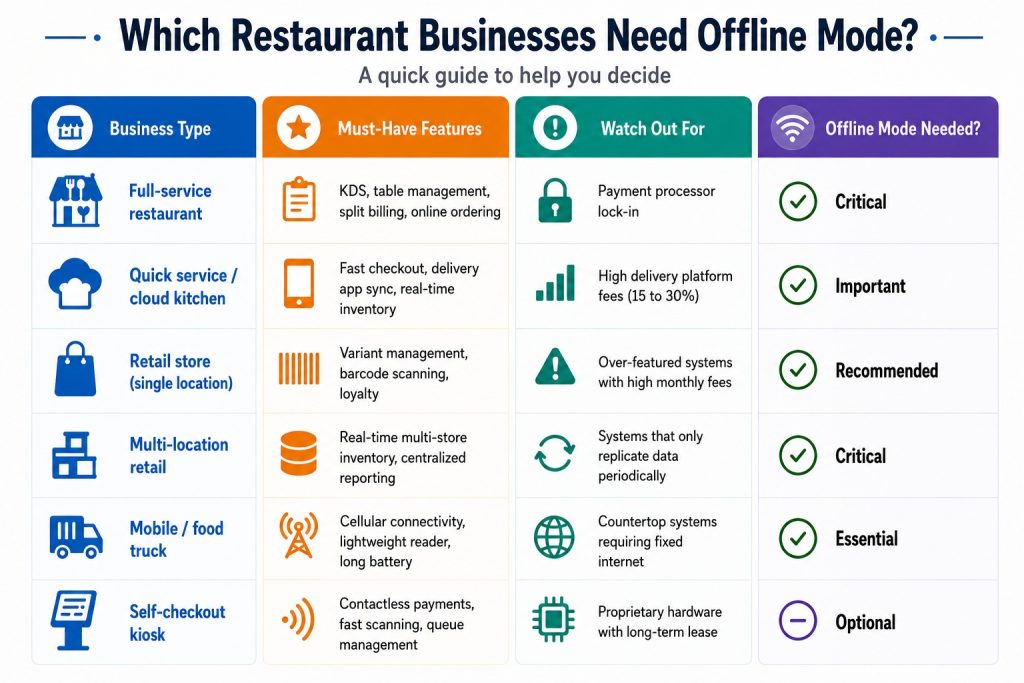
Quick comparison: what to prioritize by business type
Red flags to watch out for when comparing POS vendors
🛑 Unannounced in-person sales visits with “today only” pricing pressure
🛑 Rate quotes below 1.0% flat, as hidden fees almost always apply
🛑 Non-cancellable equipment leases (48-month leases are the worst deal in the industry)
🛑 No references from businesses in your industry with similar volume
🛑 Inventory that syncs “periodically” instead of in real time
🛑 Support teams are in the wrong time zone for your operating hours
Your pre-purchase POS evaluation checklist
✅ Define your must-have features before booking any demo
✅ Request a full cost breakdown: software, hardware, processing, and support
✅ Ask for a live demo of offline mode, not a slide deck explanation
✅ Test inventory sync speed across locations during a demo transaction
✅ Verify all promised connections are native, not middleware-dependent
✅ Ask for references from similar-sized businesses in your vertical
✅ Review the contract cancellation terms before signing anything
✅ Calculate your effective processing rate at your actual monthly volume
✅ Confirm data migration support is included, not a paid add-on
✅ Check PCI compliance tools are included in the plan, not separately billed
Ready to run through this checklist with a real system? Book a LithosPOS demo and we will walk you through every criterion live.
Frequently asked questions
1. What is the most important factor when choosing a POS system? Payment processing cost. Your POS is permanently tied to a payment processor that takes a cut of every single sale. A system with great features but locked-in high processing rates will cost you far more over time than a simpler system with flexible, competitive pricing. Before anything else, calculate your effective processing rate at your actual monthly card volume and compare it across vendors.
2. What is the difference between cloud POS and traditional POS? A cloud POS stores your data online and lets you access it from any device, anywhere. It updates automatically, has a lower upfront cost, and is ideal for businesses with multiple locations or remote monitoring needs. A traditional (on-premise) POS stores data locally on your own server, giving you full control and offline reliability but requiring a higher setup investment and in-house IT maintenance. For most modern businesses, cloud POS is the smarter long-term choice.
3. How much does a POS system cost per month? It depends on what your business needs. Basic POS software starts free for entry-level plans and scales to $40 to $400 per month for systems with inventory management, multi-location support, and advanced reporting. On top of that, factor in payment processing fees (typically 2.5 to 2.9% per transaction) and hardware costs. Always calculate the total cost of ownership, not just the software subscription fee.
4. Can a POS system work without internet? Yes, but not all systems handle it equally well. A reliable POS must queue transactions locally to a durable store that survives device restarts and auto-reconcile everything when the internet returns. Some systems marketed as offline capable only hold data in memory, meaning a reboot during an outage wipes your transaction queue. Always test offline mode live during your demo before committing.
5. What POS system is best for restaurants vs retail? They need completely different feature sets. A restaurant POS needs table management, kitchen display systems (KDS), split billing, course-by-course ordering, and delivery app sync. A retail POS needs SKU and variant management (size, color, style), barcode scanning, multi-location inventory, and e-commerce channel sync. Never use a generic or cross-purpose system for either as the workflow mismatch will create costly operational workarounds.
6. How do I avoid hidden fees when buying a POS system? Always ask for a full cost breakdown beyond the advertised software fee. Key things to ask about: menu or inventory upload fees, PCI compliance charges, hardware shipping costs, data migration fees, per-location pricing, and contract cancellation penalties. Then calculate your effective processing rate at your real monthly card volume, not the base rate shown in marketing materials. A legitimate vendor will give you all of this upfront without pressure.